
Introduction
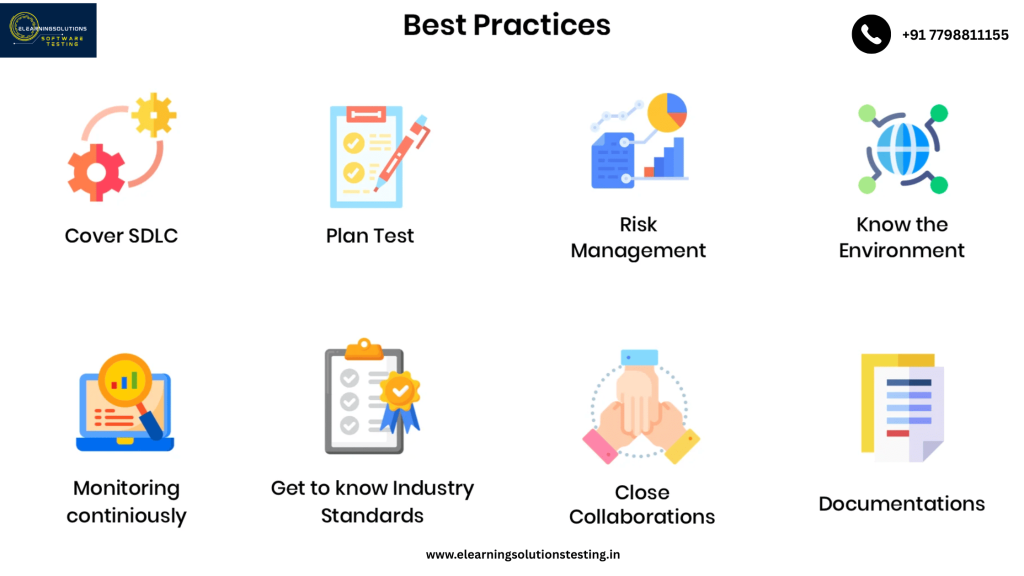
Software testing is essential to guaranteeing a product’s performance, dependability, and quality. Modern apps are becoming more complicated, thus it’s critical to employ efficient testing techniques to find defects, boost functionality, and increase user happiness. This blog examines software testing best practices that facilitate the development lifecycle and provide strong quality assurance (QA).
1. Develop a Comprehensive Test Strategy
A well-defined test strategy acts as a roadmap for the testing process. It should include:
- Clear testing objectives
- Defined scope and test coverage
- Test methodologies (manual, automated, exploratory)
- Testing tools and technologies
- Roles and responsibilities of team members
- Risk analysis and mitigation strategies
A sound plan lowers the likelihood that serious flaws will make it into production by ensuring consistency and efficacy in testing.
2. Implement Automated Testing
Automation is a game-changer in software testing. It enhances test efficiency, accuracy, and speed. To leverage automation effectively:
- Identify test cases that are repetitive and prone to human error.
- Use popular automation tools such as Selenium, TestNG, JUnit, Cypress, or Playwright.
- Implement continuous integration (CI) and continuous deployment (CD) pipelines for automated execution.
- Regularly update and maintain automated test scripts.
Automation is particularly beneficial for regression testing, performance testing, and load testing.
3. Prioritize Test Case Design
Test case design should be thorough and structured to maximize test coverage. Best practices include:
- Writing test cases based on requirements and user stories.
- Using boundary value analysis and equivalence partitioning.
- Ensuring traceability between test cases and requirements.
- Incorporating both positive and negative test scenarios.
- Keeping test cases simple, reusable, and maintainable.
Well-designed test cases improve defect detection and minimize redundant testing efforts.
4. Perform Both Manual and Automated Testing
While automation improves efficiency, manual testing is indispensable for:
- Exploratory testing to uncover unexpected issues.
- Usability testing to enhance user experience.
- Ad-hoc testing for quick validation.
- Testing edge cases that automation may miss.
Improved test coverage and quality assurance are guaranteed by a well-balanced mix of automated and manual testing.
5. Conduct Early and Continuous Testing
Shift-left testing, where testing starts early in the development lifecycle, helps in:
- Identifying defects early, reducing the cost of fixing them later.
- Preventing major integration issues by conducting unit and component tests.
- Ensuring seamless collaboration between development and QA teams.
- Implementing test-driven development (TDD) and behavior-driven development (BDD) approaches.
Continuous testing guarantees that software stays stable throughout the development cycle and allows for quick feedback.
6. Use Version Control for Test Artifacts
Managing test cases, scripts, and reports effectively is crucial. Best practices include:
- Storing test cases in a centralized repository such as TestRail, Jira, or Zephyr.
- Using Git for version control of automated test scripts.
- Implementing branching strategies for different test environments.
Proper version control ensures easy tracking of changes and maintains the integrity of test artifacts.
7. Ensure Cross-Browser and Cross-Platform Testing
Applications should function seamlessly across various devices, browsers, and operating systems. To achieve this:
- Test applications on different browsers like Chrome, Firefox, Safari, and Edge.
- Use cloud-based testing platforms such as BrowserStack or Sauce Labs.
- Validate mobile compatibility on Android and iOS devices.
Cross-browser and cross-platform testing enhance accessibility and user satisfaction.
8. Maintain Effective Defect Management
Efficient defect tracking and resolution improve software reliability. Best practices include:
- Logging defects with detailed descriptions, steps to reproduce, and screenshots.
- Categorizing defects based on severity and priority.
- Using bug-tracking tools like Jira, Bugzilla, or Mantis.
- Collaborating closely with developers for quick resolution.
A structured defect management process minimizes production failures and enhances software quality.
9. Perform Security and Performance Testing
Security and performance are critical aspects of software quality.
Security Testing Best Practices:
- Identify vulnerabilities using penetration testing tools like OWASP ZAP and Burp Suite.
- Implement data encryption and secure authentication mechanisms.
- Conduct static and dynamic code analysis.
Performance Testing Best Practices:
- Use JMeter or LoadRunner for load and stress testing.
- Monitor application response time under different loads.
- Optimize database queries and caching mechanisms.
Incorporating security and performance testing ensures a robust and scalable application.
10. Encourage Collaboration and Continuous Improvement
Effective software testing is a team effort. To foster collaboration:
- Maintain open communication between developers, testers, and stakeholders.
- Conduct regular test reviews and retrospective meetings.
- Implement feedback loops for continuous process improvement.
- Invest in ongoing training and skill development for testers.
Conclusion
Delivering high-quality applications requires software testing. Organizations can reduce risks, increase software dependability, and improve user experience by implementing these best practices. Any software product’s success is guaranteed by a comprehensive approach to quality assurance, whether it be through automation, early testing, cross-browser compatibility, or security checks.Put these tactics into practice right now to streamline your testing procedure and provide outstanding software solutions!
YOU MAY BE INTERESTED IN
The Art of Software Testing: Beyond the Basics
Automation testing course in Pune
Automation testing in selenium
Frequently Asked Questions
What are the key elements of a software testing plan?
A software testing plan should include a clear definition of the testing scope, objectives, and deliverables, as well as the timeline, budget, and resources required. It should also outline the testing approach, including the types of testing to be performed and the test environments to be used. This plan helps ensure that testing is thorough and effective.
How can I prioritize testing when there are limited resources?
Prioritizing testing involves identifying the most critical areas of the software to test, based on factors such as user impact, business risk, and functionality. By focusing on these high-priority areas first, you can ensure that the most important aspects of the software are thoroughly tested, even with limited resources. This helps maximize the effectiveness of your testing efforts.
What is the difference between black box, white box, and gray box testing?
Black box testing involves testing the software without knowing its internal workings, focusing on the inputs and outputs. White box testing, on the other hand, involves testing the software with knowledge of its internal structure and code, allowing for more in-depth testing. Gray box testing falls in between, where the tester has some knowledge of the internal workings, but not complete knowledge.
How can I ensure that my testing is effective in finding defects?
Effective testing involves creating test cases that cover a wide range of scenarios and edge cases, as well as using various testing techniques such as equivalence partitioning and boundary value analysis. It’s also important to continuously review and refine your testing approach to ensure that it’s working effectively. Additionally, using metrics such as defect density and test coverage can help you gauge the effectiveness of your testing.
What role does automation play in software testing?
Automation plays a significant role in software testing, as it allows for the execution of repetitive and time-consuming tests quickly and accurately. Automated testing can help reduce the testing cycle time, increase test coverage, and improve the overall efficiency of the testing process. However, it’s essential to strike a balance between automated and manual testing to ensure that all aspects of the software are thoroughly tested.


