

Below, we will see why the following aspects of a DB should be validated:
#1) Data Mapping
In software systems, data often travels back and forth from the UI (user interface) to the backend DB and vice versa. So these are some aspects to watch for:
- Check whether the fields in the UI/frontend forms are mapped consistently with the corresponding fields in the DB table. Typically this mapping information is defined in the requirements documents.
- Whenever a certain action is performed at the front end of an application, a corresponding CRUD (Create, Retrieve, Update and Delete) action gets invoked at the back end. A tester will have to check if the right action is invoked and whether the invoked action in itself is successful or not.
#2) ACID Properties Validation
Atomicity, Consistency, Isolation, and Durability. Every transaction a DB performs has to adhere to these four properties.

- Atomicity means that a transaction either fails or passes. This means that even if a single part of the transaction fails- it means that the entire transaction has failed. Usually, this is called the “all-or-nothing” rule.
- Consistency: A transaction will always result in a valid state of the DB
- Isolation: If there are multiple transactions and they are executed all at once, the result/state of the DB should be the same as if they were executed one after the other.
- Durability: Once a transaction is done and committed, no external factors like power loss or crash should be able to change it
Suggested reading =>> MySQL Transaction Tutorial
#3) Data Integrity
For any of the CRUD Operations, the updated and most recent values/status of shared data should appear on all the forms and screens. The value should not be updated on one screen and display an older value on another one.
When the application is under execution, the end-user mainly utilizes the ‘CRUD’ operations facilitated by the DB Tool.
C: Create – When user ‘Save’ any new transaction, ‘Create’ operation is performed.
R: Retrieve – When user ‘Search’ or ‘View’ any saved transaction, ‘Retrieve’ operation is performed.
U: Update – When user ‘Edit’ or ‘Modify’ an existing record, the ‘Update’ operation of DB is performed.
D: Delete – When a user ‘Remove’ any record from the system, ‘Delete’ operation of DB is performed.
Any database operation performed by the end-user is always one of the above four.
So devise your DB test cases in a way to include checking the data in all the places it appears to see if it is consistently the same.

#4) Business Rule Conformity
More complexity in Databases means more complicated components like relational constraints, triggers, stored procedures, etc. So testers will have to come up with appropriate SQL queries in order to validate these complex objects.
What To Test (Database Testing Checklist)
#1) Transactions
When testing Transactions it is important to make sure that they satisfy the ACID properties.
These are the statements commonly used:
- BEGIN TRANSACTION TRANSACTION#
- END TRANSACTION TRANSACTION#
The Rollback statement ensures that the database remains in a consistent state.
- ROLLBACK TRANSACTION#
After these statements are executed, use a Select to make sure the changes have been reflected.
- SELECT * FROM TABLENAME <tables which involve the transactions>
#2) Database Schemas
A Database Schema is nothing more than a formal definition of how the data is going to be organized inside a DB. To test it:
- Identify the Requirements based on which the Database operates. Sample Requirements:
- Primary keys to be created before any other fields are created.
- Foreign keys should be completely indexed for easy retrieval and search.
- Field names starting or ending with certain characters.
- Fields with a constraint that certain values can or cannot be inserted.
- Use one of the following methods according to the relevance:
- SQL Query DESC<table name> to validate the schema.
- Regular expressions for validating the names of the individual fields and their values
- Tools like SchemaCrawler
#3) Triggers
When a certain event takes place on a certain table, a piece of code (a trigger) can be auto-instructed to be executed.
For Example, a new student joined a school. The student is taking 2 classes: math and science. The student is added to the “student table”. A Trigger could add the student to the corresponding subject tables once he is added to the student table.
The common method to test is to execute the SQL query embedded in the Trigger independently first and record the result. Follow this up with executing the Trigger as a whole. Compare the results.
These are tested in both the Black-box and White-box testing phases.
- White box testing: Stubs and Drivers are used to insert or update or delete data that would result in the trigger being invoked. The basic idea is to just test the DB alone even before the integration with the front end (UI) is made.
- Black box testing:
a) Since the UI and DB, integration is now available; we can Insert/Delete/Update data from the front end in a way that the Trigger gets invoked. Following that, Select statements can be used to retrieve the DB data to see if the Trigger was successful in performing the intended operation.
b) The second way to test this is to directly load the data that would invoke the Trigger and see if it works as intended.
#4) Stored Procedures
Stored Procedures are more or less similar to user-defined functions. These can be invoked by Call Procedure/Execute Procedure statements and the output is usually in the form of result sets.
These are stored in the RDBMS and are available for applications.
These are also tested during:
- White box testing: Stubs are used to invoke the stored procedures and then the results are validated against the expected values.
- Black box testing: Perform an operation from the front end (UI) of the application and check for the execution of the stored procedure and its results.
#5) Field Constraints
The Default value, Unique value, and Foreign key:
- Perform a front-end operation which exercises the Database object condition
- Validate the results with a SQL Query.
Checking the default value for a certain field is quite simple. It is part of business rule validation. You can do it manually or you can use tools like QTP. Manually, you can perform an action that will add value other than the default value of the field from the front end and see if it results in an error.
The following is a sample VBScript code:
| 12345678 | FunctionVBScriptRegularexpressionvlaidation(pattern , string_to_match)Setnewregexp = new RegExpnewregexp.Pattern = “&lt;Defaultvalue as required by the business requirements&gt;”newregexp.Ignorecase = Truenewregexp.Global = TrueVBScriptRegularexpressionvlaidation = newregexp.Test(string_to_match)EndFunctionMsgbox VBScriptRegularexpressionvlaidation(pattern , string_to_match) |
The result of the above code is True if the default value exists or False if it doesn’t.
Checking the unique value can be done exactly the way we did for the default values. Try entering values from the UI that will violate this rule and see if an error is displayed.
Automation VB Script code can be:
| 12345678 | FunctionVBScriptRegularexpressionvlaidation(pattern , string_to_match)Setnewregexp = new RegExpnewregexp.Pattern = “&lt;Unique value as required by the business requirements&gt;”newregexp.Ignorecase = Truenewregexp.Global = TrueVBScriptRegularexpressionvlaidation = newregexp.Test(string_to_match)EndFunctionMsgbox VBScriptRegularexpressionvlaidation(pattern , string_to_match) |
For the Foreign Key constraint validation use data loads that directly input data that violate the constraint and see if the application restricts them or not. Along with the back end data load, perform the front end UI operations too in a way that will violate the constraints and see if the relevant error is displayed.
Data Testing Activities
Database Tester Should Focus on Following Testing Activities:
#1) Ensure Data Mapping:
One of the most important components of the database is data mapping, which every software tester should thoroughly evaluate.
Verify that the mapping between AUT’s various forms or screens and its database is accurate and compliant with the design papers (SRS/BRS) or code. In essence, you must verify that each front-end field maps to its matching back-end database field.
Make sure that when a user clicks “Save,” “Update,” “Search,” or “Delete” from the application’s graphical user interface, the corresponding tables and records are updated for all CRUD activities.
What you need to verify:
- Table mapping, column mapping, and Data type mapping.
- Lookup Data Mapping.
- Correct CRUD operation is invoked for every user action at UI.
- CRUD operation is successful.
#2) Ensure ACID Properties of Transactions:
ACID properties of DB Transactions refer to the ‘Atomicity’, ‘Consistency’, ‘Isolation’ and ‘Durability’. Proper testing of these four properties must be done during the database test activity. You need to verify that every single transaction satisfies the ACID properties of the database.

Let us take a simple example through below SQL code:
CREATE TABLE acidtest (A INTEGER, B INTEGER, CHECK (A + B = 100));
The ACID test table will have two columns – A & B. There is an integrity constraint that the sum of values in A and B should always be 100.
Atomicity test will ensure any transaction performed on this table is all or none i.e. no records are updated if any step of the transaction is failed.
Consistency test will ensure that whenever the value in column A or B is updated, the sum always remains 100. It won’t allow insertion/deletion/update in A or B if the total sum is anything other than 100.
Isolation test will ensure that if two transactions are happening at the same time and trying to modify the data of the ACID test table, then these tractions are executing in isolation.
Durability test will ensure that once a transaction over this table has been committed, it will remain so, even in the event of power loss, crashes, or errors.
This area demands more rigorous, thorough and keen testing if your application is using the distributed database.
#3) Ensure Data Integrity
Take into consideration that various application modules—such as screens or forms—use the same data in various ways and carry out all of the CRUD activities on the data.
If so, ensure that all locations reflect the most recent data state. On all forms and screens, the system must display the most recent and updated values or the status of such shared data. We refer to this as data integrity.

Test cases for validating Database Data Integrity:
- Check if all the Triggers are in place to update reference table records.
- Check if any incorrect/invalid data exists in the major columns of each table.
- Try to insert wrong data in tables and observe if any failure occurs.
- Check what happens if you try to insert a child before inserting its parent (try to play with Primary and foreign keys).
- Test if any failure occurs if you delete a record that is still referenced by data in any other table.
- Check if replicated servers and databases are in sync.
#4) Ensure the Accuracy of the implemented Business Rules:
Today, Databases are not meant only to store the records. In fact, Databases have been evolved into extremely powerful tools that provide ample support to the developers to implement the business logic at the DB level.
Some simple examples of powerful features are ‘Referential Integrity’, Relational constraints, Triggers, and stored procedures.
So, using these and many other features offered by DBs, developers implement the business logic at the DB level. The tester must ensure that the implemented business logic is correct and works accurately.
The above points describe the four most important ‘What To’ of testing DB. Now, let’s move on to the ‘How To’ part.
How to Test the Database (Step-by-step Process)
The general test process testing database is not very different from any other application.
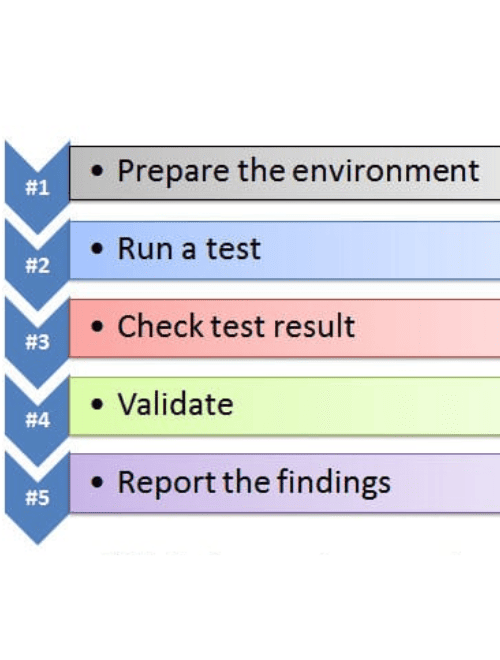
The following are the core steps:
Step #1) Prepare the environment
Step #2) Run a test
Step #3) Check test result
Step #4) Validate according to the expected results
Step #5) Report the findings to the respective stakeholders
Usually, SQL queries are used to develop the tests. The most commonly used command is “Select”.
Select * from <tablename> where <condition>
Apart from Select, SQL has 3 important types of commands:
- DDL: Data definition language
- DML: Data manipulation language
- DCL: Data control language
Let us see the syntax for the most commonly used statements.
Data Definition language Uses CREATE, ALTER, RENAME, DROP and TRUNCATE to handle tables (and indexes).
Data Manipulation language Includes statements to add, update and delete records.
Data control language: Deals with giving authorization to users for manipulation and access to the data. Grant and Revoke are the two statements used.
Grant syntax:
Grant select/update
On <table name>
To <user id1, user id2…useridn>;
Revoke syntax:
Revokeselect/update
on <table name>
from<user id1, user id2…useridn>;
Some Practical Tips
#1) Write Queries yourself:
To test the Database accurately, the tester should have very good knowledge of SQL and DML (Data Manipulation Language) statements. The tester should also know the internal DB structure of AUT.
You can combine GUI and data verification in respective tables for better coverage. If you are using the SQL server then you can make use of SQL Query Analyzer for writing queries, executing them and retrieving results.
This is the best and robust way of testing a database when the application is of a small or medium level of complexity.
If the application is very complex then it may be hard or impossible for the tester to write all the required SQL queries. For complex queries, you take help from the developer. I always recommend this method as it gives you confidence in testing and also enhances your SQL skills.
#2) Observe the data in each table:
You can perform data verification using the results of CRUD operations. This can be done manually by using application UI when you know the database integration. But this can be a tedious and cumbersome task when there is huge data in different database tables.
For Manual Data Testing, the Database tester must possess a good knowledge of database table structure.
#3) Get queries from the developers:
This is the simplest way to test the Database. Perform any CRUD operation from GUI and verify its impacts by executing the respective SQL queries obtained from the developer. It neither requires a good knowledge of SQL nor requires a good knowledge of the application’s DB structure.
But this method needs to be used cautiously. What if the query given by the developer is semantically wrong or does not fulfill the user’s requirement correctly? The process will simply fail to validate data.
#4) Make use of Database Automation Testing tools:
There are several tools available for the Data Testing process. You should choose the correct tool as per your needs and make the best use of it.
Conclusion
The need for testers to possess technical expertise in the main database concepts is growing as a result of all these features, elements, and procedures to test on a database. This area of testing is receiving a lot of attention and demand, despite some unfavorable perceptions that it leads to new bottlenecks and requires a lot of extra money.
YOU MAY BE INTERESTED IN
The Art of Software Testing: Beyond the Basics
Automation testing course in Pune
Automation testing in selenium
Mastering Software Testing: A Comprehensive Syllabus
Frequently Asked Questions
What is the main purpose of testing a database?
Testing a database is crucial to ensure that it is functioning correctly and can handle the required data and user interactions. This process helps to identify and fix any errors, bugs, or performance issues before the database is deployed. By doing so, it guarantees the reliability and integrity of the data stored in the database.
Why is database testing important for my application?
Database testing is essential for any application that relies on a database, as it ensures that the data is accurate, complete, and secure. It also helps to prevent data corruption, errors, and crashes, which can lead to a loss of user trust and reputation. Additionally, database testing helps to improve the overall performance and scalability of the application.
How does testing a database help with data security?
Testing a database helps to identify any security vulnerabilities that could put the data at risk. This includes testing for common web application vulnerabilities, such as SQL injection and cross-site scripting, as well as ensuring that the database is properly configured and patched. By identifying and addressing these security issues, database testing helps to protect sensitive data from unauthorized access.
Can I test my database manually, or do I need automated tools?
While it is possible to test a database manually, automated tools are often necessary to ensure thorough and efficient testing. Automated tools can simulate a large number of users, test complex scenarios, and identify performance issues that may not be apparent through manual testing. However, manual testing can still be useful for exploratory testing and validating specific business requirements.
What are the benefits of continuous database testing?
Continuous database testing provides several benefits, including early defect detection, improved test coverage, and reduced testing time. It also helps to ensure that the database remains stable and functional as changes are made to the application or database schema. By integrating database testing into the continuous integration and delivery pipeline, teams can ensure that the database is always ready for deployment.


