

This kind of software testing is non-functional. Understandability, learnability, operability, attractiveness, and compliance are its general categories. The purpose of usability testing is to ascertain how well we comprehend the software product, how user-friendly it is to learn and use, and how appealing it is to users under particular circumstances.
Real-world users, not the developer team, typically conduct this kind of testing. Since the development staff is the one that produced the product, they are less likely to discover user experience-related flaws.
Usability testing is mainly divided into three categories. These are:
- Explorative
- Assessment
- Comparative
Let us understand these categories in detail:
#1) Explorative
This category is typically taken into account early on in the software testing process. The lower the product risk, the earlier usability testing is carried out during the testing phase. At this stage, usability testing typically takes into account the product’s design as well as concepts associated with the product or service.
#2) Assessment
This category describes the assessment of the end-to-end execution of the test and also analyzes the effectiveness of the product and user satisfaction.
#3) Comparative
In this category, two or more identical technology items are compared based on several criteria, such as the product’s design, benefits, and drawbacks, which aids in choosing the one that offers the best user experience.
In the comparative category of usability testing, as the name implies, we compare two or more similar product types in order to comprehend their features, functions, advantages, and disadvantages. This aids in determining where the product build has to be improved in order to draw in clients and dominate the market.
Usability Testing Methods
Following are the usability testing methods that are most commonly used:
#1) Hallway Testing
When compared to other approaches, this one is among the most efficient and economical ones accessible. Instead of using trained specialists to test the product or website, a small group of people are chosen at random.
Random users test the service more efficiently, produce more accurate results, and offer candid criticism for any necessary improvements because they are not familiar with the product beforehand.
#2) Remote Usability Testing
As the name suggests, remote usability testing takes place by people who are located at remote locations, i.e. who are located in several states or sometimes in several countries for testing purposes. This type of testing is done remotely and issues can be reported if found.
Feedback can be recorded and can be submitted by random people and not a technology expert. Sometimes remote testing is executed using video conferencing. This type of usability testing adds less cost value as compared to other types of testing.
#3) Expert Review
It is requested that the subject-matter expert test the product or service, offer input, and then submit the findings. Since the business must hire a technology specialist, this kind of testing is typically costly. The results can also be submitted after a remote expert evaluation.
This kind of usability testing is completed more rapidly and with less effort. The professional swiftly identifies the weaknesses and faults in the good or service. Clients steer clear of this alternative because such testing is typically costly.
Because of the expert’s experience, this testing is trustworthy. When a product has a crucial feature and the business wants to know how users will respond before introducing it, expert review is worth the money.
#4) Paper Prototype Testing
Paper prototype testing is one of the most traditional approaches for usability testing. This method involves a dry run of the test execution, hand sketch, drawing of the models or prototype.

The goal of this kind of testing is to discuss the flow, sketch it out on paper, and take into account all potential inputs, scenarios, and conditions. One of the main forms of testing that is typically used in all projects to get rid of the main problems is this one. One can have a better understanding of the execution process by conducting paper prototype testing.
The project team typically conducts the testing of the paper prototype. As a result, it is taken into account early on in the testing procedure. Although this approach to usability testing is comparatively less expensive, it is not the most efficient because it can be time-consuming at times and there is a greater chance that some flaws will still exist after testing.
#5) Automated Usability Testing
Writing automation scripts is how this testing technique is carried out, as the name implies. We create automation scripts, and test cases are run when the scripts are activated. Following test administration, results are documented and turned in.
Employing a resource with experience in script writing and automation framework development is necessary for this kind of testing approach. Because it is less costly than expert review testing and less primary than paper prototype testing, this is one of the most used testing techniques.
Because automated scripts reduce the need for human intervention and the likelihood of losing any issues, this is one of the most successful forms of usability testing.
Usability Test Tools
There are many tools that help this process along. All these tools can be roughly categorized as follows:
Category #1) Create tasks/tests and give them to users (finding the users and giving them tasks is a manual activity, outside of the tool). While they are performing these tasks, the facilitator could watch their screen and interact with them. This could be in the lines of how you would “Skype”.
Category #2) Tool provides users or you can pick your own users. You can submit your page/design and the tasks to be performed. The tool, in turn, will provide you with the videos of the user interaction plus the user’s comments. You can make your own analysis.
Category #3) Tools that use eye-tracking and heatmap methods to determine which part of the page the user has spent the most time on. Some of the tools in this category also record the user’s clicks, scrolls, mouse moves, etc.
Category #4) Tools that provide you with feedback based on the website, page or wireframe that you submit as input. Some tools of this type also provide surveys that help in giving conclusive evidence regarding usability issues.
Category #5) Tools that recruit users for your usability test.
The above is a very broad classification. There are many other tools. And also, the division into a certain category is not always so clean. Sometimes the tools employ multiple methods at the same time.
Here is a list of tools category wise and the link to find more info about them.
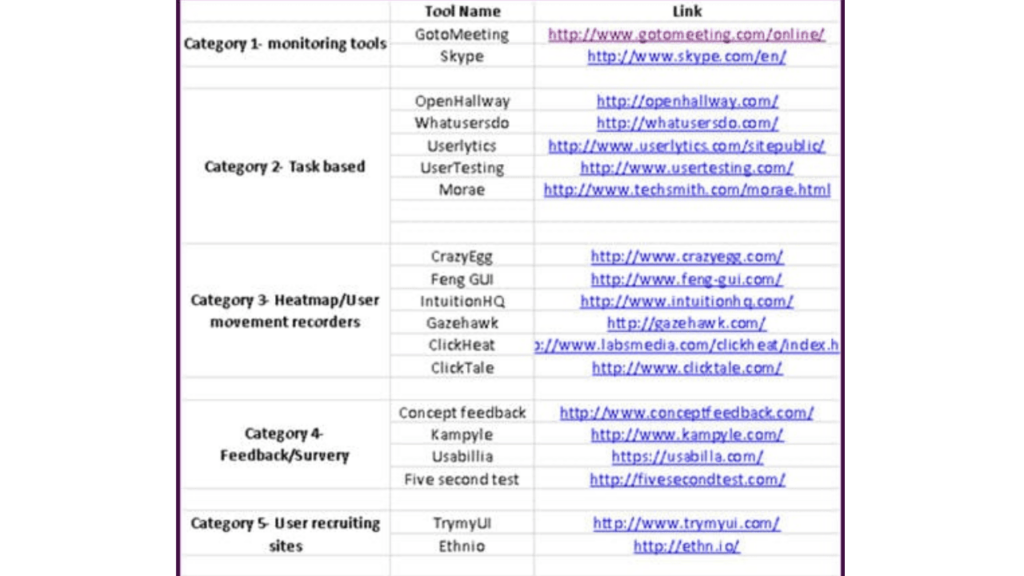
The user can finish the activity more quickly and effectively by using various usability testing techniques. These tools aid in determining what constitutes a better user experience. Because usability testing technologies are costly and clients do not want to spend money on them, not all projects use them.
One of the most often used tools for usability testing is CrazyEgg. Because it is a click-based user experience tool, it is simple to use..
Here is the list of most popularly used tools:
- UXtweak
- CrazyEgg
- Userzoom
- Loop11
- Optimizely
- TryMyUI
- UserTesting.com
- Qualaroo
- Usabilla
- UserFeel
- Userlytics
- Validately.com
Further reading => List of Best Usability Testing Tools
Advantages and Disadvantages
Advantages of Usability Testing:
- By executing a usability test, we can improve on the flaws of the product, if found any, and rectify them before the launch of the product. Executing tests will thereby help in boosting product quality.
- Many times internal discussions are headed towards debates that can be resolved after performing usability testing, which helps in understanding the user experience better.
- Sometimes it is observed that the development team fails to detect a few minor defects which can be found by executing usability testing.
- As the feedback is directly from the user side, it becomes beneficial for the business to improve the product according to the target audience.
Disadvantages of Usability Testing:
- Financial constraint is one of the major disadvantages as one needs to recruit and manage the resources for usability testing.
Different Participants or Elements
The project’s complexity and financial constraints determine who participates in usability testing. More people are taken into consideration if the project is extremely complex and has important characteristics. In contrast, the mid-level complexity project is tested with a small team of participants.
Usability testing often involves a researcher and a small number of volunteers. While teams of five to 10 people are typically observed, the number of participants varies from three to twenty-five.

The researcher is also known as a facilitator or moderator, where the researcher is the one who observes the participants and moderates the task performed by them and also records the feedback.
Mainly there are three elements, which are as follows:
Researcher, Participant, and Task to be performed.

While the facilitator assists the participants in completing the activity, the participant is the one who actually completes it. To help participants test the service more successfully and in the proper direction, the facilitator and participants hold brainstorming sessions.
Additionally, the facilitator verifies the accuracy of the results that are submitted. Participants receive directions from the researcher using task sheets, verbal communication, or video conference if the test is conducted remotely. Participants may be asked cross-questions by the facilitator to ensure that their work is proceeding as planned.
The researcher can regulate the execution flow if they discover any deviations in the work that was completed.
Different Phases Of Usability Testing
Let us understand how to start usability testing? OR what are the different phases of usability testing?
Same as for other testing techniques, usability testing also should be started as early as possible. Different stages of includes planning, recruiting, execution, data analysis, and reporting.

#1) Planning
In software testing, this is the initial step. The project’s goal is established during the planning phase. The project’s documentation is completed during the planning phase. One of the most important and basic phases of software testing is this one.
We create the roadmap for the testing procedure at this point. We prepare for inquiries such as what to test. How can I test? Which features would be tested by whom? Which various circumstances are to be taken into account for testing? We compile the business requirements and create the plan during the planning phase.
#2) Recruiting
In this phase, we recruit the facilitator and the participants according to the budget and complexity of the project.
#3) Execution
In this stage, the participants perform usability testing and perform the assigned task.
#4) Data Analysis
During the data analysis stage, the feedback received from usability testing is analyzed. Results are categorized and patterns are identified. The conclusion is generated from the feedback submitted to improve the product and thereby improve the business.
#5) Reporting
The feedback and findings received are shared with the customers and the development teams across the project. Discussion on the areas of improvement and its implementation is considered in this stage.

Factors To Consider While UX Testing
First and foremost, the earlier you test the better it is to prevent risk, wastage of time, and budget of the project.
- Areas of improvement can be handled more easily if testing has started at an early stage.
- Select a team of users who would be executing the task.
- We need to understand the target audience to know more about the user experience and the product. This will help us understand who will be using the product, what are the needs of the user of these categories. Purpose of using the product. Is the product able to satisfy the users?
- Possible ways of using the product and additional features which the user might look for in the future.
- Discuss the improvement areas with the development team and work with them accordingly.
- We also need to consider the performance and the rate of response while testing the product.
Usability Testing Examples
For analyzing testing results, we should always think through users’ points of view. We need to keep in mind the features that will impact and improve the user experience. To understand this better, let us discuss a few examples below.
Example 1: Usability Testing Of A Travel Website.
Consider the below scenario for testing a travel website.
#1) Booking a flight

While considering scenarios for booking a flight, the user should be able to select one-way and return flight options. One option which can improve the user experience is if the user could select the multiple cities option.
#2) Booking of hotels

While considering that the user is traveling to a city, he/she may also look for accommodation. If a user could find both flight booking and hotel accommodation in one place, can add up to user satisfaction. As the user does not have to browse ten different websites. Everything is taken care of in one place and hence more users will be attracted towards the website.
#3) Renting a car/two-wheeler

While the user is planning to travel to a city for vacation or for small business, they may require a vehicle for traveling locally. If the website has the option of renting the vehicle, it may attract the users to the website positively.
#4) Tracking the flight
This is one of the important features which customers look for before arriving for the flight.
This screen should show the flight status of both from arrival and departure as per the source city mentioned. Also, for a better user experience, the page should contain search options for a quick search based on Airline, Time, or Destination.
#5) Things to do/best places to visit
This could be an extra feature that will interest the users of the website. Through this feature, the user gets to know about the place better and things to explore around. This can add the possibility that the user would rent a vehicle for local transport. If the website has the feature of renting a vehicle and places to visit around, this will add an advantage.
#6) Managing past booking
Both the user and the business owner benefit greatly from this feature since it makes it simple for the user to repeat the recently traveled option if their needs are similar.This feature allows the business owner to see what kind of user and what kind of bookings are made, which can assist them give the user better offers and bargains to help the business grow.
If the user needs to provide a receipt for the reservations they made in order to receive reimbursement and they have misplaced it, this function is quite helpful. This function allows the user to obtain a duplicate receipt from the website.
Since this function was helpful, the user may think about this website in the future and serve as the spokesperson for a good word to others.
#7) Customer Service
In addition to all the services on the website, customer service is the resource to turn to if a user needs assistance or runs into any problems. Since client happiness is our goal when conducting usability testing, this is a very important element.
contacting customer support through chat, email, or phone. Customers will also benefit from the posting of commonly asked questions.
Let’s talk about an additional application.
Example 2: Getting Transportation Online Using Uber
#1) Booking a ride
This is the primary functionality of the application that even if 100’s users are trying to book the ride at the same time, the user should be able to book the ride.

#2) Types of ride
The user should be able to view and book all the types of rides available starting from micro, mini, prime, Sweden, carpool, etc. The number of available seats in the ride is also displayed with the type of ride.

#3) Estimated time of arrival
While booking it should display the estimated time of arrival so that the user can decide between the different ride options available.
#4) Estimated cost while booking the ride
While booking it should display the estimated cost so that the user can book from the different ride options available.
#5) Ride later option
If the user wants to pre-book the ride, so the person should be able to book a ride of personal desire.

#6) Share ride option
If the user has booked a ride for his friend and wants to share the ride details with his friend. The person should be able to share the ride details.
#7) Adding different payments
The user should be able to pay in all the modes. Like a credit card, debit card option, UPI, wallet, or cash payment. The application should ask for confirmation before saving the credit card, debit card credentials.

#8) Customer support
Users should be able to connect to customer service via call, email, or chat. Posting frequently asked questions will also help customers. It is also helpful in case if the person by mistake forgot any belongings, or if the driver has charged him incorrectly, also if the driver tried to misbehave or if the user wants to file a complaint or seek any kind of help.
This feature proved to be one of the most important features for users seeking help.

#9) Cancel the booked ride
If the user booked a ride just by mistake and wishes to cancel, then the user should be able to cancel the booked ride.
#10) Call the driver
It may happen that the driver is not able to locate the rider at the pickup location, or the user is at the pickup location and not able to find the driver. This feature reduces confusion and saves time if the driver is not aware of the location, he can contact you and reach you easily.
What Happens After Usability Testing
While considering the above example, the features mentioned are the ones received as feedback from the user while using the travel website and online vehicle booking application. There could be few more required features depending upon the customer requirements and usage of the website.
After completion of the usability testing, the first thing to do is to bring together all the feedback and conclusions and then to discuss what all we can be accommodated as improvement of the product/service. How much time will be required to incorporate the changes? If the project team is not clear about the changes to be implemented, then they can discuss again and clear the ambiguities.
The impact of the enhancements depends on the target audience who is going to use the application, the purpose of the application, and the features that need to be added or improved on the website. After all of the above points are discussed, it is a management call while considering the features of the product. This also depends on the business impact of the feature.
More About Usability Testing

A usability test makes sure that the interface of an AUT is built in a way that fits the user’s expectations with respect to meeting requirements (effectiveness) easily (efficiently) in a simplistic satisfying manner.
The primary focus is on:
- Ease of use
- Ease of Learning or familiarizing with the system
- The satisfaction of the user with the entire experience
Usability has many dimensions to it. It is all about the user’s ‘experience’ during their interaction with an application and their ‘feeling’ towards it. A structured Usability Test translates this experience/feeling into a Validation Process.
Why It Is Performed
In recent years, the corporate sector has been dominated by the Web and mobile applications. For these apps to be adopted by users, they must be effective, efficient, simple, easy to use, appealing, engaging, etc. The main goal of the usability test is to ascertain whether or not a user would want to use and return to a website.
Not just software systems are affected by this. These guidelines must be followed by any device or interface that allows for human contact. In what way do you ask? If the voting machines were unusable, democracy would suffer. If I had to click more than one button to select my candidate, I wouldn’t cast my ballot. Would you? Indeed!
Check out this $300 million piece by Jared Spool for a more software-specific explain how the placement of a button has caused the business to be impacted.
When Is Usability Testing Conducted
As testers, we know that the earlier a defect is found in the SDLC the cheaper it is to fix it. The same concept holds true for testing Usability also.
Usability Test results affect the design of the product. So, ideally, the usability test should start at the design level. But that is not all; software undergoes many changes/interpretations/implementations throughout the SDLC process. To make sure that we do not make usability-related mistakes at any of these steps – this testing should be conducted often and continuously for maximum results.
Who Performs This Testing
It can be done as an internal process, when the designers, developers, and anyone else can sit down and analyze their system and get the results. Based on these results, the design and/or code can be modified to be in accordance with the changes they all agree on.
A more advanced approach is to hire real-time users and give them particular tasks. A facilitator/s can devise these tasks and get the results from the users.
The users can then provide information, on whether:
- The task was successful or not
- The task could be performed easily
- Was the experience interesting, engaging, or annoying – their feeling towards the software
How To Conduct Usability Testing – Process
Testing is a validation of software against its requirements. A usability test is not different – The only requirement, in this case, is to validate if the software is as per a mental map of how a user would want the software to be like, what makes it comfortable for them to use, what kind of holistic experience is the user going to take away from the interaction, etc.
These are just a few of the ways in which this testing is carried out.
#1) During the design phase, you could just take draw your website/application design on a piece of paper and evaluate whether it is going to work or not.
#2) An exploratory method would be to build the site and perform some random tests (by the development/design/QA- any or all internal teams) to determine usability factors.
#3) Hire a set of real-time users to work on the site and report results.
#4) Use a tool that would provide statistics based on the input wireframes and designs submitted.
#5) Hire a third-party usability team that specializes in this field.
#6) Submit your site design and wireframes to an external evaluator and get results from them.
The structured Usability Testing process contains the following steps:
Step #1) Identifying the users to perform the Usability Test – it helps to choose the set of users that is close to how the real-time users are going to be. Care has to be taken not to pick experts or complete newbies. The experts are going to simply run through the entire process and the novices need lots of background training to even get started- neither situation is optimum.
Step #2) Designing the tasks that the users are going to perform on the application –A list of situations which the users are going to use the application form is to be made prior to starting the test. This can include something like: ‘Search for an X-box and buy it” or ‘submit a customer care question” etc. on an eCommerce site. The tasks should closely represent the real transactions the users would use the site for.
Step #3) Facilitating the testing – The usability team will have the users perform the tasks on the site and are going to gather information regarding the test progress and results. It really makes a huge difference when the design team participates while the users are working on the application. It gives them a better picture of how the app was used and where it did not deliver what the user wanted etc, firsthand.
Step #4) Analyze results – At the end of the test, we might end up with the time it took to perform tasks, whether the task was successful or not, etc, so basically raw data. The results have to be presented to all the stakeholders and analyzed for the identification of potential problem areas.
From what we have discussed so far, these are my impressions:
#1) Testing Usability is not an out-and-out QA task. A role that traditional QA teams could play in this context is that of a facilitator who would create tasks, conduct the test, and interpret the result. The ‘tester’ in this case is actually the user.
#2) The end results or outcome of usability testing are not defects. It is simple information on how the user felt, what they liked, what they did not – raw data. The usability tester’s job does not end with reporting the results (in the case of traditional QA jobs, we report bugs and do not get involved in fixing them), it includes providing suggestions on how to make the software more conducive to user interaction.
#3) By understanding these concepts, we can actually make a difference as functional testers. To add more value to our role as QAs we can apply these usability concepts and provide insightful suggestions on how to improve the usability of an application.
Frequently Asked Questions
What is usability testing in software testing?
It is a non-functional type of software testing that is used to determine how easily the users can understand and use the product.
How is Usability Testing done?
Mostly a dedicated team performs usability testing. The team consists of participants who perform the task assigned to them and report the observation. Whereas the facilitator is the one who moderates the team.
What is the purpose of Usability Testing?
The product developed should satisfy the user’s requirement. By performing usability tests, we can find out about user experience and improve the product where there is a scope for improvement.
What are the three main principles of Usability Testing?
These are:
1. It deals with product development.
2. It involves studying real users as they use the product and understanding their user experience.
3. It involves improvement in the product according to user experience and setting goals and a timeline to achieve that.
What are Usability features?
There are five characteristics of Usability. These are as follows:
1. Effective
2. Efficient
3. Engaging
4. Error Tolerant
5. Easy to learn
Conclusion
Usability testing in the software testing life cycle was covered in detail in the tutorial above. Topics including the need for usability testing, its benefits and drawbacks, the various usability testing participants or components, etc., are also covered in the course.
Additionally, we have discussed in detail, with examples, the various usability testing tools and how to assess test findings.
Usability testing is essential since it provides an opportunity for improvement prior to the product’s release. As a result, this enhancement may favorably impact the company. Therefore, usability testing is crucial and ought to be carried out in order to give clients better deliverable products.
YOU MAY BE INTERESTED IN
The Art of Software Testing: Beyond the Basics
Automation testing course in Pune
Automation testing in selenium
Mastering Software Testing: A Comprehensive Syllabus
Frequently Asked Questions
What is usability testing and why is it important?
Usability testing is a method of evaluating a product or system by testing it with real users to identify areas for improvement. This process helps ensure that the product is user-friendly, efficient, and meets the needs of its target audience. By conducting usability testing, developers can identify and fix issues early on, saving time and resources in the long run.
How does usability testing differ from other types of testing?
Usability testing focuses on the user’s experience and interaction with a product, whereas other types of testing, such as functional or unit testing, focus on the product’s technical aspects. Usability testing is concerned with how easy or difficult it is for users to accomplish their goals, while other types of testing focus on whether the product works as intended. This distinction makes usability testing a unique and essential part of the product development process.
What are the benefits of conducting usability testing?
Conducting usability testing can help identify and address usability issues early on, reducing the risk of costly redesigns or rework later on. It can also help improve user satisfaction, increase conversion rates, and enhance the overall user experience. Additionally, usability testing can provide valuable insights into user behavior and preferences, informing product development and improvement efforts.
How is usability testing typically conducted?
Usability testing is typically conducted by observing users as they interact with a product or system, often in a controlled environment such as a usability lab. Moderators may ask users to complete specific tasks or think aloud as they navigate the product, providing feedback and insights on their experience. The testing process can be conducted in-person or remotely, and may involve surveys, interviews, or other methods to gather additional feedback.
Can usability testing be conducted on any type of product or system?
Yes, usability testing can be conducted on any type of product or system, including websites, mobile apps, software applications, and even physical products. The testing process can be adapted to fit the specific needs and requirements of the product, and can be conducted at various stages of development, from prototypes to fully launched products. This flexibility makes usability testing a valuable tool for a wide range of industries and applications.


