

It is crucial to remember that a better E-Commerce website will translate into a better business. The application must go through extensive testing because it is so important.
Web and mobile applications are also included in Testing E-commerce Websites and applications. They so go through every kind of standard exam.
- Functional Testing
- Usability Testing
- Security Testing
- Performance Testing
- Database Testing
- Mobile Application Testing
- A/B testing.
Retail websites, on the other hand, are very dynamic. New items, sales, bestsellers, and other promotions are constantly coming up. This indicates that the website changes frequently. For many, it can become very overwhelming.
The trick is to divide and conquer.
Please see with the examples of how to test and eCommerce Site:
E-Commerce Testing Checklist
We have listed important segments and test cases for eCommerce website testing below.
#1) Homepage – Hero Image
Homepages of retail sites are busy. They have a lot going on. But almost all of them have a Hero Image:

This is the kind of clickable image (a slideshow of sorts) that occupies the majority of the page.
The following are a few things to test:
- Is it going to auto scroll?
- If yes, at what interval will the image be refreshed?
- When the user hovers over it, is it still going to scroll to the next one?
- Can it be hovered on?
- Can it be clicked on?
- If yes, is it taking you to the right page and right deal?
- Is it loading along with the rest of the page or does it load last in comparison to the other elements on the page?
- Can the rest of the content be viewed?
- Does it render the same way in different browsers and different screen resolutions?
#2) Search
Search algorithms are very important for the success of a retail site because we can’t always place what the users want to see right in front of their eyes.
Common tests are:
- Search based on the Product name, brand name, or something more broadly, the category. For example Camera, Canon EOS 700D, electronics, etc.
- Search Results have to be relevant
- Different sorts of options have to be available- based on Brand, Price, and Reviews/ratings etc.
- How many results are displayed per page?
- For the multi-page results, are there options to navigate to them
- Also, searches happen in many places. Please take the search drilling down to multiple levels into consideration when validating this functionality. For example: When I search on the home page, I might see something like the following:

When I navigate to categories and go to a sub-category, maybe movies, this is what I am going to see:

#3) Product Details Page
Once a user finds a product either through search or by browsing or by clicking on it from the homepage, the user will be taken to the product information page.
Check:
- Image or image of the product
- Price of the product
- Product specifications
- Reviews
- Check out options
- Delivery options
- Shipping information
- In-stock/Out of stock
- Multiple color and variation options
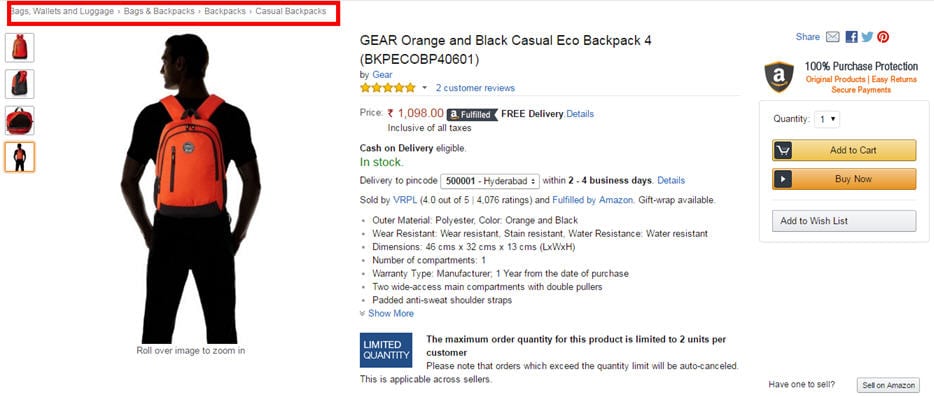
- Breadcrumb navigation for the categories (highlighted in red below). If navigation such as this is displayed, make sure every element of it is functional.
#4) Shopping Cart

This is the penultimate stage before the user commits to the purchase.
Test the following:
- Add items to your cart and continue shopping
- If the user adds the same item to the cart while continuing to shop, the item count in the shopping cart should get incremented
- All items and their totals should be displayed in the cart
- Taxes as per location should be applied
- The user can add more items to the cart and the total should reflect the same
- Update the content added to the cart which should also reflect in the total
- Remove items from the cart
- Proceed to checkout
- Calculate Shipping costs with different shipping options
- Apply coupons
- Don’t check out, close the site, and come back later. The site should retain the items in the cart
#5) Payments
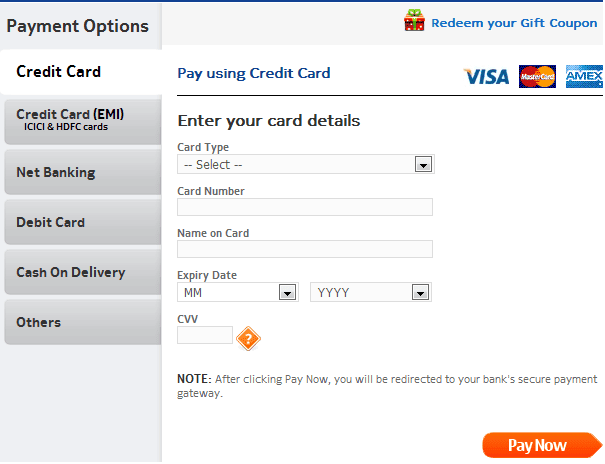
- Check for different payment options
- If allowing you to check out as a Guest, simply finish the purchase and provide an option to register at the end
- Returning customers – Login to check out
- User sign up
- If you are storing a customer’s credit card or any other financial information, perform security testing around this to make sure it is secure.(PCI compliance is a must)
- If the user is signed up for a long time, make sure the session is timed out or not. Every site has a different threshold. For some, it is 10 minutes. For some, it might be different.
- Email/Text confirmation with the order number generated
#6) Categories/Featured Products/Related or Recommended Products
The most popular FAQ I get from e-commerce testers is: Do I have to test every category/every product?
The answer is NO.
If you are a returning customer you will be shown some recommended products on the home page or in your shopping cart.

Featured products also change almost every day.

Since these are dynamic components, testing the algorithm that populates these sections is the most effective method of testing these application components.
Examine your BI/data mining systems and verify the queries that fill these sections from the backend.
#7) After-Order Tests

Check:
- Change the Order
- Cancel the Order
- Track the Order
- Returns
#8) Other Tests
- Login
- FAQs
- Contact Us page
- Customer Service page, etc.
Challenges Automating E-commerce Websites
You must narrow the timetable as much as possible while concentrating on the functionality and quality of your e-commerce website in order to stay on Safer Edge and provide the client with the intended outcomes.
Choosing the appropriate test automation framework is the first step in automation testing, and it has a direct effect on the project’s outcome. Test scenarios and scripts for a variety of automated procedures must be included in the framework.
The framework makes it simple for the testers to run the tests and provide test reports with pertinent data. However, a number of important factors must be considered before choosing the best tool to automate the e-commerce website.Comparing the various tools according to crucial criteria such as functionality, performance, extensibility, licensing cost, maintenance cost, training and support.
You must take advantage of many open source test automation tools to automate more testing efforts without investing additional funds.
#1) E-commerce websites are very entangled in nature, automating each action is not possible because we cannot assume the nature of the customer.
#2) Continuous changes for e-commerce demands Regression so run regression test suit every day to keep track of the effects of change.
#3) Always go with the Automated Integration type of scenarios that should be covered from selecting a link on the home page to the checkout and payment gateway page. Hereby, you can at least cover the maximum user experience with an e-commerce website, so that adequate testing can be achieved by automating regression cycle.
#4) Never waste time automating unstable applications. A simple change will affect your whole test suit and you have to recreate it.
#5) Homepage of E-commerce Website is very important and the content has a lot of information and 1000 of links associated with each product and these links grow up every day as new offers or product is added to a page. So before proceeding to regression testing, it’s best to verify every link on the page using the HTTP status code.
#6) When you are executing test scripts on a different browser at the same time. If a product is added to a shopping cart or removed, that information should be reflected in other browsers too.
#7) When you running test parallel this will obviously fail your script in such a scenario that you have to periodically refresh your page to retain cart information. In real-time you may come across this scenario such as a user may sometimes use mobile e-commerce app and also a mobile e-commerce web application.
#8) Don’t neglect to verify each product details and pricing details whether it is 10 products or 1000 products it should be as per the seller requirement. This is the phase where you can make or break a customer’s slight mistake which will lead to a big loss.
#9) Create yourself a lot of interrupted scenarios that usually users come across to design your script very robustly so that your script can afford it and still run and pass the script.
For example, you stored all the card information and clicked on submit due to low charge or network issue application stuck. If a user is notified about their transaction status through email or message to phone, you should validate this email or message in a test script.
#10) Web element of the e-commerce website keeps changing so always Create a manual xpath. Some Web Elements attributes will be the same so there will be no unique way of distinguishing in such scenario use contains() method of xpaths or scroll into view.
#11) Automate Accessibility Testing with keyboard actions without using mouse action you will definitely come across some of the problems and fix them. This plays a significant role in user interface testing.
#12) Tester should carefully design the scenario and add initiate checkpoint and insert login script whenever it is required.
#13) Maintain different scripts for different modes of payment to avoid confusion. Check if what happens if an order is canceling after payment.
#14) Performance testing on the other hand plays a very crucial role. The factors you need to test here request per second, Transaction Per minute, Execution per click, a Response time of page load, duration of the task, Length of time between click and page display and DNS lookup.
#15) Security Testing is where customer trust is gained on which e-commerce is built so here you have to spend a lot of time testing on DENIAL OF SERVICE ATTACK, User Account security, Data confidentiality, content security, credit card security, disabled non-essential services. SSL Certificate Validation.
#16) Automating Localization testing is very challenging in e-commerce because of Compliance with accessibility standards to support multi-lingual markets and business regions.
Conclusion
Let’s move on to some final comments on eCommerce testing now that we have a few tests identified.
A website should function on mobile devices as well as PCs. You must be secure and quick to respond. ETL procedures and database optimization should support the upkeep of a data warehouse that supports OLAP and BI. All of it should be the subject of e-commerce testing.
However, determining whether or not visitors are turning into paying clients is the most crucial aspect of e-commerce testing. The term “Conversion Rate” refers to the quantity of visits that result in a client.
YOU MAY BE INTERESTED IN
The Art of Software Testing: Beyond the Basics
Automation testing course in Pune
Automation testing in selenium
Mastering Software Testing: A Comprehensive Syllabus
Frequently Asked Questions
What are the key areas to focus on when testing an e-commerce website?
When testing an e-commerce website, key areas to focus on include user registration and login, product search and filtering, payment gateways, and order management. Additionally, testing for security vulnerabilities and ensuring compliance with industry standards is crucial. This helps to ensure a smooth and secure user experience.
How do I test the payment gateway on an e-commerce website?
To test the payment gateway, use a combination of real and mock payment data to simulate various payment scenarios, including successful and failed transactions. You should also test for payment method options, such as credit cards, PayPal, and bank transfers, to ensure they are functioning correctly. This helps to identify any issues with the payment processing system.
What types of testing are required for an e-commerce website?
Required testing for an e-commerce website includes functional testing, performance testing, security testing, and usability testing. Functional testing ensures that the website’s features and functionalities work as expected, while performance testing evaluates the website’s speed and scalability. Security testing identifies vulnerabilities and weaknesses in the website’s code and infrastructure.
How can I ensure that my e-commerce website is accessible on different devices and browsers?
To ensure that your e-commerce website is accessible on different devices and browsers, perform cross-browser and cross-device testing using various tools and platforms. This includes testing on different desktop and mobile browsers, such as Chrome, Firefox, and Safari, as well as on different operating systems, including Windows, macOS, and Android. This helps to identify and fix any compatibility issues.
What are some common e-commerce website testing tools and technologies?
Common e-commerce website testing tools and technologies include Selenium for automated testing, JMeter for performance testing, and OWASP ZAP for security testing. Additionally, tools like TestComplete and Appium can be used for functional and regression testing, while browser extensions like Chrome DevTools can be used for debugging and troubleshooting. These tools help to streamline the testing process and ensure thorough coverage.


