

amic Testing
- Equivalence Partitioning
- Boundary Value Analysis
- Decision table
- Cause and Effect graph technique
- State Transition diagram
- Orthogonal Array Testing(OATS)
- Error Guessing.
Here at STH, we have several excellent publications on the first, second, and third points (decision tables, BVA, and equivalency partitioning). Point 4—the Cause and Effect graph—will be the topic of my discussion.
Introduction To Cause And Effect Graph
The Root Cause and Impact Graph is a dynamic method for creating test cases. Here, the input conditions are the causes, and the outcomes of those input conditions are the effects..
Suggested reading =>> What is Dynamic Testing?
Cause-Effect In order to minimize test execution time and expense, the graph technique starts with a set of requirements and calculates the bare minimum of test cases required for maximum test coverage.The objective is to cover the required test cases for maximum coverage while lowering the overall number of test cases while maintaining the required application quality.
But at the same time obviously, there are some downsides to using this test case writing technique. It takes time to model all your requirements into this Cause-Effect Graph before writing test cases.
The Cause-Effect Graph technique restates the requirements specification in terms of the logical relationship between the input and output conditions. Since it is logical, it is obvious to use Boolean operators like AND, OR and NOT.
Notations Used:

Now let’s try to implement this technique with some examples:
- Draw a Cause and Effect graph based on a requirement/situation.
- Cause and Effect Graph is given, draw a Decision table based on it to draw the test case.
Let’s see both of them one by one.
Draw A Cause And Effect Graph According To Situation
Situation:
The “Print message” is software that reads two characters and, depending on their values, messages is printed.
- The first character must be an “A” or a “B”.
- The second character must be a digit.
- If the first character is an “A” or “B” and the second character is a digit, then the file must be updated.
- If the first character is incorrect (not an “A” or “B”), the message X must be printed.
- If the second character is incorrect (not a digit), the message Y must be printed.
Solution:
The Causes of this situation are:
C1 – First character is A
C2 – First character is B
C3 – the Second character is a digit
The Effects (results) for this situation are:
E1 – Update the file
E2 – Print message “X”
E3 – Print message “Y”
LET’S START!!
First, draw the Causes and Effects as shown below:
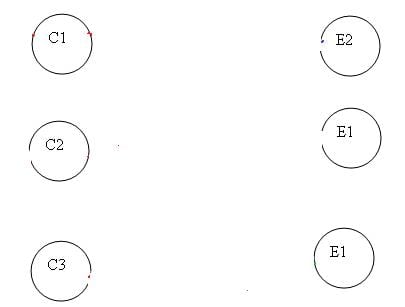
Key – Always go from Effect to Cause (left to right). That means, to get effect “E”, what causes should be true.
In this example, let’s start with Effect E1.
Effect E1 is for updating the file. The file is updated when
– The first character is “A” and the second character is a digit
– The first character is “B” and the second character is a digit
– The first character can either be “A” or “B” and cannot be both.
Now let’s put these 3 points in symbolic form:
For E1 to be true – the following are the causes:
– C1 and C3 should be true
– C2 and C3 should be true
– C1 and C2 cannot be true together. This means C1 and C2 are mutually exclusive.
Now let’s draw this:
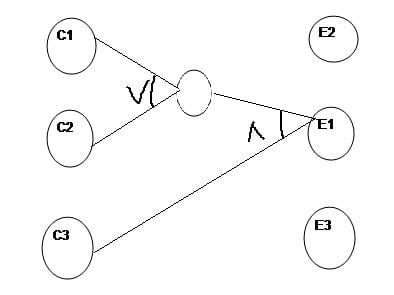
So as per the above diagram, for E1 to be true the condition is (C1  C2)
C2)  C3
C3
To make the graph less cluttered, the middle circle is merely an interpretation of the middle point.
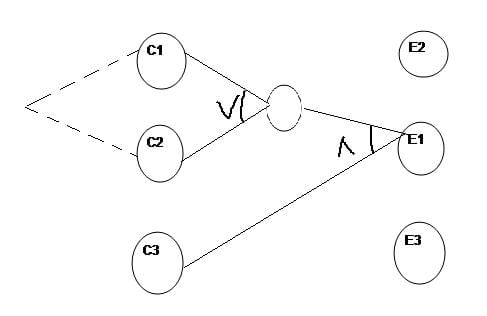
C1 and C2 are mutually exclusive under a third condition. Therefore, the following is the final graph for effect E1 to be true:
Let’s move to Effect E2:
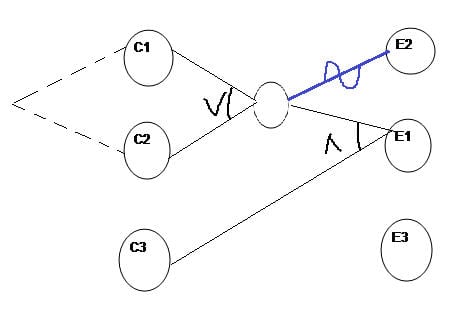
E2 states print message “X”. Message X will be printed when the First character is neither A nor B.
This means Effect E2 will hold true when either C1 OR C2 is invalid. So the graph for Effect E2 is shown as (In blue line)
For Effect E3.
E3 states print message “Y”. Message Y will be printed when the Second character is incorrect.
This means Effect E3 will hold true when C3 is invalid. So the graph for Effect E3 is shown as (In Green line)
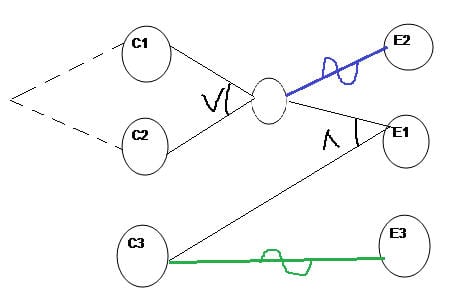
This completes the Cause and Effect graph for the above situation.
Now let’s move to draw the Decision table based on the above graph.
Writing Decision Table Based On Cause And Effect graph
First, write down the Causes and Effects in a single column shown below
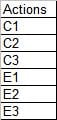
The Key is the same. Go from bottom to top which means traverse from Effect to Cause.
Start with Effect E1. For E1 to be true, the condition is (C1 C2) C3.
Here we are representing True as 1 and False as 0
First, put Effect E1 as True in the next column as
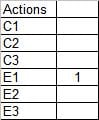
Now for E1 to be “1” (true), we have the below two conditions –
C1 AND C3 will be true
C2 AND C3 will be true
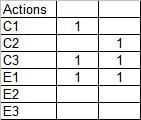
For E2 to be True, either C1 or C2 has to be False shown as,
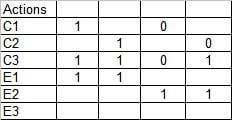
For E3 to be true, C3 should be false.
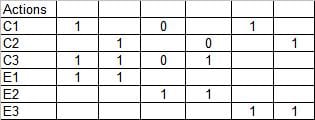
So it is completed. Let’s complete the graph by adding 0 in the blank column and include the test case identifier.
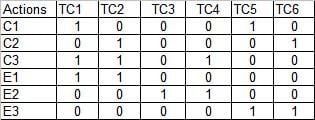
Writing Test Cases From The Decision Table
Below is a sample test case for Test Case 1 (TC1) and Test Case 2 (TC2).

In a similar fashion, you can create other test cases.
(A test case contains many other attributes like preconditions, test data, severity, priority, build, version, release, environment, etc. I assume all these attributes to be included when you write the test cases in the actual situation)
Conclusion
Summarizing the steps once again:
- Draw the circles for Causes and Effect Graphs
- Start from Effects and move towards the Cause.
- Look for mutually exclusive causes.
The Cause and Effect graph dynamic test case writing technique is now complete. We’ve learned how to create a graph and a decision table with it. Writing test cases based on the decision table is a relatively simple last step.
YOU MAY BE INTERESTED IN
The Art of Software Testing: Beyond the Basics
Automation testing course in Pune
Automation testing in selenium
Mastering Software Testing: A Comprehensive Syllabus
Frequently Asked Questions
What is the most effective technique for writing test cases for dynamic testing?
The most effective technique is to use a combination of equivalence partitioning and boundary value analysis, as this allows testers to cover a wide range of scenarios and edge cases. This approach helps to ensure that the test cases are comprehensive and effective in identifying defects. By using these techniques, testers can reduce the number of test cases while still maintaining coverage.
How do I prioritize test cases when writing test cases for dynamic testing?
Prioritization of test cases is based on risk and business criticality, where high-risk and high-business-value test cases are executed first. This approach ensures that the most critical areas of the application are thoroughly tested, and any defects found are addressed promptly. Testers can use techniques such as risk-based testing to identify the most critical test cases.
What is the role of exploratory testing in dynamic testing?
Exploratory testing plays a significant role in dynamic testing, as it allows testers to explore the application without preconceived notions or scripts. This approach enables testers to identify issues that may not have been caught through scripted testing, and it can be used in conjunction with other testing techniques to ensure comprehensive coverage. Exploratory testing can be used to supplement scripted testing and identify new issues.
How can I ensure that my test cases are reusable and maintainable when writing test cases for dynamic testing?
To ensure that test cases are reusable and maintainable, testers should focus on creating modular and independent test cases that can be easily updated or modified. This can be achieved by using techniques such as parameterization and data-driven testing, which allow testers to separate test data from test scripts. Additionally, using a test management tool can help to organize and maintain test cases.


