
The various Functions performed by Banking Applications are:

Let’s first understand the characteristics of a Banking Application:
- Multi-tier functionality to support thousands of concurrent user sessions.
- Large-scale Integration: Typically, a banking application integrates with numerous other applications such as Bill Pay utility and Trading Accounts.
- Complex business workflows
- Real-Time and Batch processing
- High Rate of Transactions per second
- Secure Transactions
- Robust Reporting section to keep track of day-to-day transactions.
- Strong Audit to troubleshoot customer issues.
- Massive storage system
- Disaster / Recovery Management
The 10 points listed above are the most important characteristics of a banking application.
Banking applications have multiple tiers involved in performing an operation.
For example, a Banking application may have:
- Web Server to interact with end-users via Browser.
- Middle Tier to validate the input and output for the webserver.
- Database to store data and procedures.
- Transaction Processor which could be a large capacity Mainframe or any other Legacy system to carry out Trillions of transactions per second.
When we talk about testing banking applications, it requires an End to End Testing methodology involving multiple Software Testing techniques to ensure:
- Total coverage of all banking workflows and Business Requirements.
- The functional aspect of the application
- The security aspect of the application
- Data Integrity
- Concurrency
- User Experience
What makes banking applications so complex?
- Banking software mainly deals with confidential financial data so the performance of software should be error-free and secure.
- Developers prefer a complicated design to develop these applications to ensure that the application runs in a desired secure manner.
- Banking is a constantly changing world. Banking, today, is made available to the customer using different channels like brick & mortar branches, ATMs, online banking and customer care.
- With the advent of technology, many wallets have flooded the markets that connect to the banking systems for financial transactions.
- Banking is also expected to be up and running 24/7 with high performance. Software upgrades, instant fixes, etc. cannot be allowed to impact this availability.
- The banking world is also highly impacted by the constant changes brought in by the government in the form of banking regulations. Any changes to the tax structure will impact the banking system as well.
- The banking system also needs to be up-to-date as far as new technologies are concerned. Data analytics like Big Data Processing and getting instincts out of big data using Data Science is growing traction in the banking world.
The above mentioned points make the banking system complex for developers to create a software application around it.
Importance of Testing Banking Application
- Testing the Banking application assures that all the activities are not only executed well but also remain protected and secured.
- Banking software is complicated with thousands of dependencies, and the testing process requires more time, resources, and continuous monitoring.
- As finances are involved here guidelines have to be followed strictly. Both testers and developers should have good domain knowledge.
- Most importantly, it has to be ensured that the laws and regulations are enforced correctly in financial transactions. This can only be ensured with testing.
- It’s also important to ensure that the application and the infrastructure on which the application has been deployed is able to handle the load, especially during peak business hours, without causing any disruption. This can be ensured by performing performance testing.
- In today’s digital world, the one thing that concerns everyone is that of security. The banking applications and the financial transactions that are performed within it need to be secure from any attempt to break-in. This can be ensured by performing security testing. Security testing helps to enforce industry standards to secure financial transactions.
- It’s also important to ensure that different modules of a banking application are integrated properly and the objective of the client is achieved. System Integration Testing helps to achieve this task.
Banking App Testing Workflow
The typical stages involved in testing Banking Applications are shown in the below workflow. We will be discussing each stage individually.
This is the Waterfall model for testing an application.
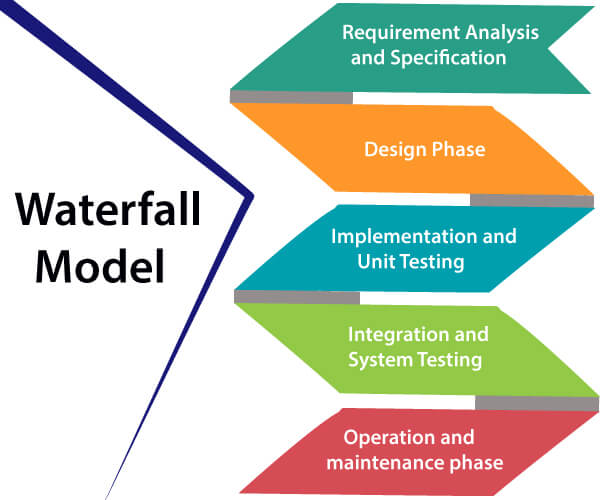
#1) Requirement Gathering
Documenting needs as use cases or functional specifications is part of the requirement gathering phase. Banking experts or business analysts collect requirements based on client needs and document them..

Because banking comprises many sub-domains and a full-fledged banking application will integrate all of these domains, experts write requirements on many subjects.
For example, a banking application may have separate modules for Transfers, Credit Cards, Reports, Loan Accounts, Bill Payments, Trading etc.
#2) Requirement Review
The deliverable of Requirement Gathering is reviewed by all the stakeholders such as QA Engineers, Development leads and Peer Business Analysts.

They cross-check that neither the existing business workflows nor new workflows are violated. All the requirements are verified and validated. Follow up action and requirement document revisions are done based on the same.
#3) Business Scenario Preparations
Using the requirement documents (use cases or functions specifications), QA engineers create business scenarios at this step. These scenarios are created so that every business requirement is met. High-level scenarios devoid of specific processes are known as business scenarios.
Additionally, business analysts examine these business scenarios to make sure that all business requirements are satisfied.Reviewing high-level situations is simpler for BAs than going over intricate, low-level test cases.
For example, a customer opening a Fixed deposit on the digital banking interface can be a business scenario. Similarly, we have different business scenarios related to net banking account creation, online deposits, online transfers, etc.
#4) Functional Testing
At this stage, functional testing is performed and the usual software testing activities are performed such as:
Test Case Preparation: At this stage Test Cases are derived from Business Scenarios, one Business Scenario leads to several positive and negative test cases. Generally, tools used during this stage are Microsoft Excel, Test Director, or Quality Center.
Test Case Review: Reviews by peer QA Engineers
Test Case Execution: Test Case Execution could be either manual or automatic by involving tools like QC, QTP, etc.
The functional testing of a banking application is quite different from ordinary software testing. Since these applications operate with customer’s money and sensitive financial data, they are required to be tested thoroughly. No important business scenario should be left to be covered.
Also, the QA resource who is testing the application should have the basic knowledge of the banking domain.
#5) Database Testing
Banking Application involves complex transactions which are performed both at UI level and Database level, Therefore, Database testing is as important as functional testing. The database is complicated & is an entirely separate layer in the application and thus its testing is carried out by database specialists.
It uses techniques like:
- Data loading
- Database Migration
- Testing DB Schema and Datatypes
- Rules Testing
- Testing Stored Procedures and Functions
- Testing Triggers
- Data Integrity
The major purpose of database testing is to ensure that:
- The Application is able to store and retrieve data from the database without any loss of data.
- Completed transactions should be committed and aborted transactions should be reverted back to avoid any mismatch in data stored.
- Only authorized applications and users are allowed to access the database and the underlying tables.
There are primarily three ways of Database Testing:
- Structural Testing
- Functional Testing
- Non-Functional Testing
Structural Testing
It involves testing database objects like databases, schemas, tables, views, triggers, access controls, etc. Ensuring that data types in tables are in sync with the corresponding variables in the application. Validating data and referential integrity in the tables.
For example, the amount field in the application should have a data type of decimal/float in the table.
In order to comply with these standards, users should be given access controls through views.
Functional Testing
It involves testing the databases that satisfy user requirements. There are two ways to achieve this i.e. black box testing and white box testing.
For Example, when we do an online money transfer, the sender’s account should be debited and the recipient account should be credited with the exact same amount. If the transaction fails then the whole transaction should be reverted and the sender’s account should not be debited or credited back.
Non-Functional Testing
It involves load & stress testing and performance optimization. Load testing helps in identifying the most number of transactions that can be performed concurrently without impacting database performance.
For example, based on the input from load and stress testing, banking applications can decide to add more resources to their application during peak business hours and reduce the resources during off business hours. This helps the bank to make optimum use of resources and save money.
#6) Security Testing
Security Testing is usually the last stage of the testing cycle. A prerequisite for commencing security testing is the completion of functional and non-functional testing. Security testing is one of the major stages of the entire Application testing cycle as this stage ensures that the application complies with Federal and Industry standards.
Banking apps are extremely sensitive and a prominent target for fraud and hackers because of the nature of the data they hold.
Security testing makes that the application is free of online vulnerabilities that could provide attackers or intruders access to private information. Additionally, it guarantees that the application conforms with OWASP and other standards.
The main duty at this point is the entire application scan, which is done with the most widely used tools, such as IBM AppScan or HP WebInspect.
The Scan Report is published after the scan is finished. False Positives are removed from this report, and the remaining vulnerabilities are submitted to the development team so that, based on the severity of each issue, they may begin resolving them.
At this stage, penetration testing is also carried out to identify the error propagation.Platforms, networks, and operating systems should all undergo thorough security testing.
A few other Manual tools for Security Testing used are Paros Proxy, Http Watch, Burp Suite, and Fortify.
The main purpose of security testing is to pinpoint any vulnerabilities that the software application may have.
Security Testing tests the application against:
- Any external attack or attempt to hack the application with malicious intent.
- Any loophole in the software application could be exploited causing data or monetary loss.
- Any vulnerability in the network, servers, or workstations that hosts the application.
Given below are the various types of Security Testing:
Vulnerability Testing: An automated program is developed and executed to check for various vulnerabilities.
Security Scanning: This variant revolves around investigating network & system vulnerabilities, thereby providing solutions to reduce the associated risk.
Penetration Testing: This variant of security testing imitates a hacking attempt to capture vulnerabilities and loopholes, which otherwise could have gained access to the database or the application data.
Security Audit: This involves auditing the application and the associated networks for any security lapses.
Risk Assessment: This variant does an analysis to assess the level of risk, in an event when a vulnerability or loophole is exploited for malicious intent. Such risk could be categorized into low, medium, and high. Based on the level of risk, proper measures are advised by the testing team to reduce or avert the risk.
Ethical Hacking: This is performed by an organization on its systems to identify loopholes that could be exploited in its application or network. The intent of this kind of hacking is not to steal or cause damage to the application or network.
Posture Assessment: This is an umbrella assessment that comprises security scanning, risk assessments, and ethical hacking.
SQL Injection: SQL Injection could be used to gain access to the server database. Testing is done to ensure that the code is working correctly, which executes queries in the database based on the following inputs from the user:
- Brackets
- Apostrophes
- Commas
- Quotation Marks
Other Stages in Testing the BFSI App
Apart from the above main stages, there might be different stages involved such as Integration Testing, Usability testing, User acceptance testing, and Performance Testing.
Let’s talk briefly about these stages as well:
Integration Testing
As you are aware, a banking application may contain multiple modules, such as those for deposits, bill payments, transfers, etc. As a result, numerous components are developed. All of the components are combined and verified during integration testing.
Usability Testing

A banking application caters to a diverse range of users. It’s possible that some of these users lack the knowledge and abilities needed to complete banking chores via the app.
Therefore, it is important to test the banking application for ease of use and efficiency so that it can be used by a variety of consumer groups. Customers will use the banking application more frequently if the UI is clear and easy to use.
It’s about examining the level of ease that business users or bank customers have in using the application. This testing is not performed by the developer or tester but is performed by the business users.
For example, nowadays everyone uses mobile apps. The banking app should be user-friendly and easy to understand and use by the end-user.
Types of Usability Testing
Comparative Usability Testing: This is a comparison-based testing, where the ease of usability of one website or application is compared with another. The target for such testing is to provide the best user experience.
Explorative Usability Testing: The aim of this testing is to identify what features the new application or software should possess in order to meet the bank’s customer requirements.
Given below are the advantages and disadvantages of Usability Testing
Advantages:
- The end-users of the application are usually involved with the testing, hence first-hand feedback is obtained.
- Rather than spending time on analysis and discussion about a feature that a product should have or not, it is better to get the inputs from the end-user directly.
- We can catch any potential issues beforehand.
Disadvantages:
- As multiple end-users are involved in testing, their opinions, if not precise, can affect the requirement.
- The feed from end-users may be influenced.
Performance Testing
Certain periods of time, like payday, the end of the financial year, and the festive season, might bring in change or spike in the usual traffic on the app. Hence, thorough performance testing should be done so that customers don’t get affected by performance failures.
A significant example of the past where bank customers were personally affected due to performance failures is the NatWest and RBS cyber Monday IT outage in which customers had their debit and credit card declined transactions across shops in the country.
User Acceptance Testing
This is done by involving the end-users to ensure that the application complies with real-world scenarios and will be accepted by users if it goes live.
In today’s scenario majority of Banking Projects are using: Agile/Scrum, RUP, and Continuous Integration methodologies and Tools packages like Microsoft’s VSTS and Rational Tools.
As we mentioned about RUP above, RUP stands for Rational Unified Process, which is an iterative software development methodology introduced by IBM which comprises of four phases in which development and testing activities are carried out.
Four phases are
i) Inception
ii) Collaboration
iii) Construction and
iv) Transition
RUP widely involves IBM Rational tools.
Sample Test Cases for Banking Application
Test cases for New Branch
- Create a new branch with valid and invalid test data.
- Create a new branch without data.
- Create a new branch with existing branch data.
- Verify the reset and cancel options.
- Update branch details with valid and invalid test data.
- Update branch details with existing branch test data.
- Verify if the new branch can be saved.
- Verify if the cancelation option is working.
- Verify the branch deletion with and without dependencies.
- Verify if the branch search option is working.
Test Cases for New Role
- Create a new role with valid and invalid test data.
- Create a new role without data.
- Verify if a new role can be created with existing test data.
- Verify the role description and role type.
- Verify that the cancelation and reset options are working.
- Verify the role deletion process with and without dependency.
- Verify the links in the role details page.
- Verify the admin login without test data.
- Verify all home links for the admin role.
- Verify if the admin can change the password with valid and invalid test data.
- Verify the admin log out successfully.
Test cases for Customer and Banker
- Verify if all visitor and customer links are working properly.
- Verify the customer’s login with valid and invalid test data.
- Verify the customer’s login without any data.
- Verify the banker login without any data.
- Verify the banker’s login with valid or invalid test data.
- Verify if the customer or banker was able to log out successfully.
Test cases for New users
- Verify if the new user can be created with valid and invalid test data.
- Create a new user with existing branch test data
- Verify if the cancel and reset options are working properly.
- Update user details with valid and invalid test data.
- Verify the deletion of the new user.
- check if the new user can be verified.
- Verify mandatory input parameters.
- Verify optional input parameters.
- Verify if a user can be created without optional parameters.
Test cases for the creation of a New Account
- Create a new account with valid and invalid user data.
- Verify if the user details can be updated.
- Verify if a new user can be saved.
- Create a new account with existing user data.
- Verify that the user can deposit the amount into the newly created account (and update the balance).
- Verify if the user can withdraw the amount from the new account (after depositing and updating the balance).
- In the case of salary, the account verifys the company name and other details provided by the user.
- Verify if the primary account number is provided in case of a secondary account.
- Verify the user details provided in the case of the current account.
- Verify the provided proof for the joint account in case of a joint account.
- Verify whether you are able to maintain a zero balance in your salary account.
- Verify whether you are able to maintain a zero balance or minimum balance for a non-salary account.
- Verify that the new user was able to log out successfully.
Test Cases For Net Banking Application
- Check if the user is able to open the bank site.
- Check if all the links on the site are working.
- Verify if the user is able to create a new account.
- Check if the user is able to log in with a valid and invalid username and password.
- Verify if either the username or password is blank while logged in, the user should not be allowed to log in and an alert message should be shown.
- Check if the user is allowed to change the password.
- If an invalid username or password is entered, a proper error message will be shown.
- Users with an invalid password should not be allowed to log in.
- Verify that after repeated attempts to log in with an incorrect password, the user should be shown an error message and blocked.
- Check if the user is able to perform some basic transactions.
- Verify that the user is able to add a beneficiary with valid and invalid details.
- Verify if the user can delete the beneficiary.
- Verify that the user is able to make transactions to the newly added beneficiary.
- After the transaction, verify if the accounts of both the user and beneficiary have been updated.
- Check if the user is able to enter the amount in decimal numbers.
- Verify if the user is not able to enter negative numbers in the amount field.
- Verify if the user is allowed to make transactions with or without a minimum balance.
- Verify if the user can make a new RD.
- Verify that the correct message is showing in case of a transaction done with insufficient balance.
- Check if the user is asked for confirmation before any transaction is made.
- Verify if acknowledgment receipts are provided on each successful transaction.
- Verify if the user is able to transfer money to multiple accounts.
- Verify if the user can cancel the transaction.
- Verify that the account details reflect the financial transactions done.
- Verify that the timeout feature has been implemented.
- Verify that in case of session time out a user should log in again.
- Verify that the proper session time out is done in case of any inactivity.
- Verify that while doing the transaction the user is taken to secure mode.
- Verify if the user was able to log out successfully.
- Verify search and reset options.
Conclusion
In this lesson, we covered the standard stages of application testing as well as the potential complexity of a banking application.
In addition, we talked about the current trends in the IT industry, such as tools and software development processes.
YOU MAY BE INTERESTED IN
The Art of Software Testing: Beyond the Basics
Automation testing course in Pune
Automation testing in selenium
Mastering Software Testing: A Comprehensive Syllabus
Frequently Asked Questions
What are the key areas to focus on when testing a banking application?
When testing a banking application, focus on security, user interface, and functional testing to ensure that transactions are processed correctly and user data is protected. This includes testing for common vulnerabilities such as SQL injection and cross-site scripting. Additionally, verify that the application complies with relevant banking regulations.
How do I simulate real-world scenarios when testing a banking application?
To simulate real-world scenarios, use test data that mimics actual user interactions, such as depositing and withdrawing funds, paying bills, and transferring money. You can also use automated testing tools to simulate a large volume of users and test the application’s performance under heavy loads. This helps ensure that the application can handle real-world usage.
What types of testing should I perform on a banking application?
Perform a range of testing types, including functional, performance, security, and usability testing, to ensure that the application meets the required standards. Functional testing verifies that the application works as expected, while performance testing checks its speed and efficiency. Security testing identifies vulnerabilities and ensures that user data is protected.
How can I ensure that the banking application is compliant with regulatory requirements?
To ensure compliance, review relevant banking regulations, such as the Payment Card Industry Data Security Standard (PCI DSS) and the General Data Protection Regulation (GDPR), and test the application against these standards. Verify that the application implements required security controls, such as encryption and access controls, and that user data is handled in accordance with regulatory requirements.
What tools can I use to test a banking application?
Use a range of testing tools, including automated testing frameworks, such as Selenium and Appium, to test the application’s functional and performance aspects. Additionally, use security testing tools, such as OWASP ZAP and Burp Suite, to identify vulnerabilities and test the application’s security controls. You can also use specialized banking testing tools, such as those provided by testing service providers.


