
When we think about building great software, it’s easy to imagine complex code, automation scripts, and cutting-edge AI tools. But at the heart of every reliable application lies something far more human—manual testing.
In this blog, we’ll break down the Manual Testing Life Cycle (MTLC) into simple steps, pair each with real-life examples, and explore why this process still holds incredible value in today’s fast-paced tech world. Whether you’re a beginner aiming to enter the QA world or a company employee curious about how testing works, this guide will help you understand the fundamentals and see how it connects to real business success.
What is the Manual Testing Life Cycle (MTLC)?
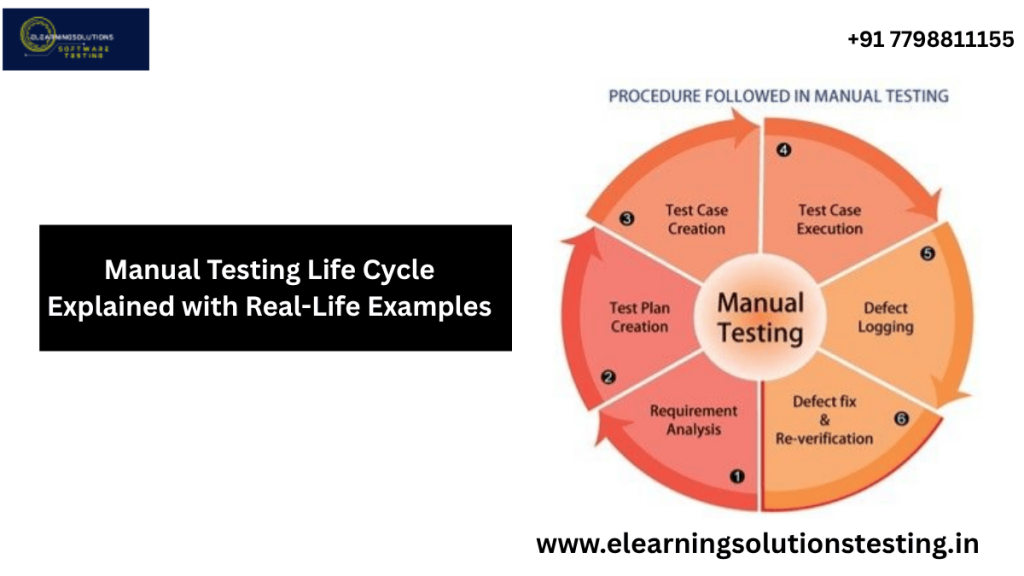
The Manual Testing Life Cycle is a structured process followed by testers to ensure software works as intended. Unlike automated testing, it involves human effort, observation, and judgment—making it perfect for catching issues that automation might miss.
Think of MTLC like test-driving a car before selling it. Automation is like a machine checking the engine, but manual testing is you driving the car, feeling the steering, listening to the sounds, and making sure it feels right.
Step-by-Step Manual Testing Life Cycle with Real-Life Examples
1. Requirement Analysis
Purpose: Understand what needs to be tested and why.
Example: Imagine you’re testing a mobile banking app. The requirement might say, “Users should be able to transfer money to any account instantly.” You need to clarify:
- What is “instantly”? Seconds or minutes?
- Can transfers happen without internet?
This phase is about asking the right questions before starting work.
Pro Tip: Keep a checklist of unclear points—it saves hours later.
2. Test Planning
Purpose: Create a roadmap for testing—what to test, how to test, resources needed, and deadlines.
Example: For the banking app, you’d decide:
- Will you test on Android, iOS, or both?
- Do you need test accounts with different balances?
- What’s the deadline for each module?
Just like planning a trip, good preparation means fewer surprises later.
3. Test Case Development
Purpose: Write step-by-step instructions to validate each requirement.
Example Test Case:
Title: Verify successful money transfer
Steps:
- Log into the app
- Go to “Transfer”
- Enter recipient account number and amount
- Click “Submit”
- Check confirmation message
If you miss writing clear steps, testers may interpret requirements differently—leading to inconsistent results.
4. Environment Setup
Purpose: Prepare the hardware, software, and test data.
Example:
If you’re testing a ticket booking website, you might need:
- A staging server with test user accounts
- Simulated credit card numbers
- Different browsers (Chrome, Firefox, Safari)
This step is like setting the stage before a play—without it, the show can’t go on.
5. Test Execution
Purpose: Run the test cases and record results.
Example:
Following the money transfer test case, you:
- Perform each step exactly as written
- Record whether the result matches expectations
If something fails, note the exact conditions—it helps developers fix the issue faster.
6. Defect Reporting
Purpose: Log any issues found, with details and evidence.
Example:
If the app says “Transaction Failed” even with sufficient balance, you report:
- Steps to reproduce
- Screenshots or videos
- Expected vs. actual results
A clear, detailed bug report is gold for developers—it reduces back-and-forth communication.
7. Test Closure
Purpose: Finalize testing, summarize results, and share insights.
Example:
You create a final report saying:
- 90% of test cases passed
- 5 major bugs fixed
- 2 medium-priority bugs pending
It’s the “closing ceremony” of your testing process—lessons learned here improve future projects.
Why Manual Testing Still Matters in 2025
Despite the rise of automation, manual testing remains crucial for:
- Usability checks – Only humans can truly judge if something feels intuitive.
- Exploratory testing – Catching unexpected issues without predefined scripts.
- Visual verification – Identifying UI/UX inconsistencies automation might miss.
Market Insight: According to a 2024 QA industry report, over 45% of companies still rely on manual testing for critical releases, proving its relevance even in AI-driven workflows.
Practical Tips for Beginners
- Learn common bug patterns – Many issues repeat across projects.
- Communicate effectively – Clarity in reporting speeds up fixes.
- Stay curious – Explore beyond the test case; sometimes the biggest issues are where no one looks.
- Pair with automation – Understanding both worlds makes you highly valuable.
Real-World Applications
- E-commerce: Testing cart functionality, payment gateways, and search filters.
- Healthcare software: Ensuring patient data displays correctly.
- Banking apps: Validating security features and transaction flows.
Final Thoughts
Mastering the Manual Testing Life Cycle is more than following steps—it’s about developing an eye for detail, patience, and a mindset that prioritizes quality. If you’re starting your journey, remember: every bug you find is one less headache for users.
Ready to take your QA skills to the next level? Explore our in-depth Software Testing Courses that cover both manual and automation testing, packed with real-world projects and mentorship opportunities. Your career in QA starts here.
Frequently Asked Questions
What is the manual testing life cycle and how does it apply to real-life projects?
The manual testing life cycle refers to the series of steps involved in testing a software application, from planning to test execution and closure. This cycle is essential in real-life projects as it ensures that the software meets the required standards and is free from defects. By following this cycle, testers can identify and report defects early on, reducing the overall cost and time of the project.
How do I plan and prepare for manual testing in a real-world scenario?
Planning and preparation for manual testing involves identifying the scope and objectives of the test, creating a test plan, and developing test cases and scripts. This phase also includes setting up the test environment and identifying the necessary resources and personnel. Effective planning and preparation are crucial to ensure that the testing process is efficient and effective.
What are some common techniques used in manual testing, and how are they applied in real-life examples?
Common techniques used in manual testing include black box testing, white box testing, and gray box testing, as well as exploratory testing and usability testing. These techniques are applied in real-life examples by testing the software’s functionality, performance, and usability, and identifying defects and areas for improvement. For instance, a tester may use black box testing to verify that a login feature is working correctly.
How do I execute and report manual tests, and what are some best practices to follow?
Executing manual tests involves running the test cases and scripts, identifying and reporting defects, and re-testing the software after defects have been fixed. Best practices include using a test management tool to track and manage test cases, reporting defects clearly and concisely, and re-testing the software thoroughly to ensure that defects have been resolved. Testers should also follow a consistent and standardized approach to test execution and reporting.
What are some common challenges faced during the manual testing life cycle, and how can they be overcome?
Common challenges faced during the manual testing life cycle include time constraints, limited resources, and inadequate test planning. These challenges can be overcome by prioritizing testing activities, using automated testing tools to supplement manual testing, and continuously reviewing and refining the test plan. Testers should also communicate effectively with stakeholders and team members to ensure that everyone is aware of the testing progress and any issues that arise.


