
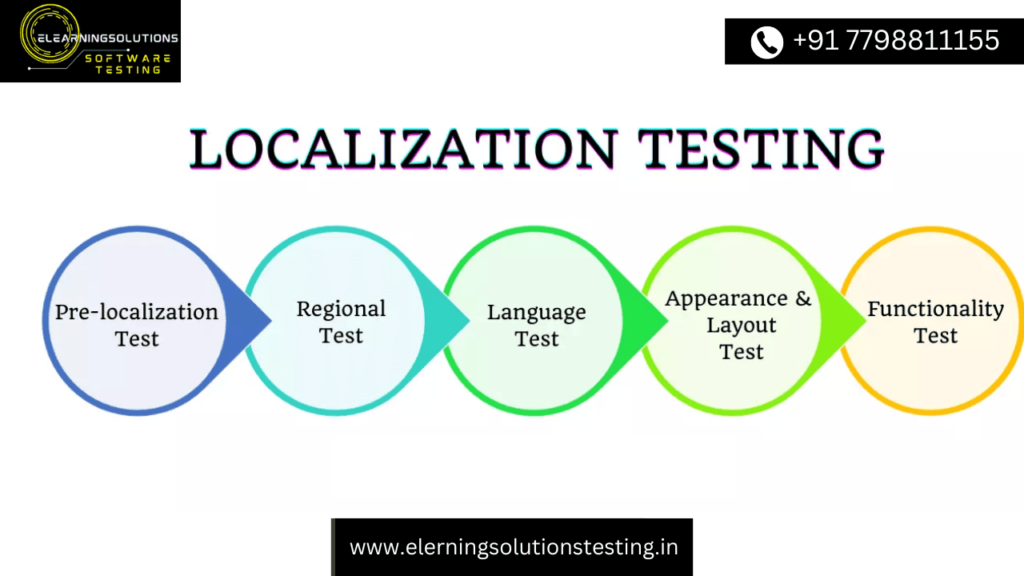
Localization Testing and International Testing
In order to localize a product, it is very important to find out if it is internationalized.
Are you confused? An internationalized Product/application design is the one that can accommodate localized content such as characters in non-western letters, double-byte languages, an ability for text to expand as in European languages and contract as in Asian languages, display Unicode characters and have a database that supports Unicode characters etc.
We will discuss both localization and internationalization testing in detail in this article.
What Is Localization Testing
Localization is defined as making a product, application or document content adaptable to meet the cultural, lingual and other requirements of a specific region or a locale.
Localization is abbreviated as l10n, where 10 is the number of letters between l and n. When a thought of localization, what comes to mind is that the user interface and documentation of an application are in a specific language or locale. But localization is more than just that.
When localizing an application, the following important areas are to be customized:
- Date and time formats (including numeric formats)
- Currency used
- Keyboard usage
- Sorting, aligning and collating data
- Colors schemes, symbols, and icons
- Text and graphics which, in a given culture, may be viewed as sensitive or can be misinterpreted.
- Diverse legal requirements
The main aim of localization is to make the product look and feel such that, to the target audience, it looks like it is specially created to meet their needs.
Recommended Tool:
#1) Digivante

If you’re working in global markets, it’s essential that your website or app is customized to local audiences so that your brand is well-received.
But localization isn’t just about checking that translated content is literally correct and uses the local dialect. Colours, data formats, currencies, and payment platforms are just a few of the areas that need to be tested.
Their global community of expert testers can run fast, thorough testing on your sites and apps so you know exactly what you need to do to optimize the local experience.
Localization and internationalization are together referred to as globalization. Globalization is at a broader level. Internationalization makes the application such that it supports multiple languages/locales. Localization is making an application that supports a particular locale and language.
The following figure will help you understand how localization and internationalization together make a globalized software application.
What Is Internationalization
Internationalization is the process of designing and developing a product, application or document content such that it enables localization for any given culture, region, or language.
Internationalization is also written i18n, where 18 is the number of letters between me and n in the word internationalization.
Internationalization typically entails the following:
- Designing and developing the application such that it simplifies the deployment of localization and internationalization of the application. This includes taking care of proper rendering of characters in various languages, string concatenation etc. which can be done using Unicode during development
- Taking care of the big picture while developing the application in order to support bidirectional text or for identifying languages we need to add markup in our DTD. Also, we use CSS to support vertical text and other non-Latin typographic features.
- The code should be able to support local and regional languages and also other cultural preferences. This involves using predefined localization data and features from existing libraries. Date time formats, local calendar holidays, numeric formats, data presentation, sorting, data alignment, name and address displaying format etc.
- Making localizable elements separate from the source code so that the code is independent. Then, as per the user’s requirements, localized content can be loaded based on their preferences.
Internationalization basically consists of design and development of an application to make it ready for localization. It is not necessary that language, culture and region-related translation takes place. It is to make an application ready for migration at a later stage in case localization is to take place.
The following diagram will help explain the difference between nationalization and internationalization.
(Click on the image for an enlarged view)
Let’s summarize the difference between localization and internationalization in the table given below:
| Localization Testing | Internationalization Testing |
|---|---|
| 1. Localization is defined as making a product, application or document content adaptable to meet the cultural, lingual and other requirements of a specific region or a locale. | 1. Internationalization is the process of designing and developing a product, application or document content such that it enables localization. |
| 2. Localization is referred as l10n | 2. Internationalization is referred as i18n |
| 3. Localization focuses on online help, GUI context, dialog boxes, error messages, read me/ tutorials, user manuals, release notes, installation guide etc. | 3. Internationalization focuses on compatibility testing, functionality testing, interoperability testing, usability testing, installation testing, user interface validation testing. |
| 4. Localization itself means a specific local language for any given region | 4. Application code is independent of language |
| 5. Localization is not at user interface level | 5. Internationalization is at design level |
Scope of Testing
Major focal points to be considered for localization and internationalization testing are as follows:
1) Language
- Unicode text to cater to character encoding
- Number systems
- Writing directions
- Spelling variants
- Capitalization and sorting rules
- Keyboard shortcuts and layouts
2) Culture and region
- Names and titles
- Government numbers (Social Security number is in the USA) and passports
- Colors and images
- Telephone number, zip code, Address formats
- Paper Sizes
- Weights and measures
- Currency symbol and currency market position
3) Dates and Important Events
- Date and time formats
- Calendar types (Gregorian, Lunar, etc.)
- Number formats (decimal separators, grouping of digits, etc.)
Testing Best Practices for Testing Internationalization
Various areas are impacted when an application is internationalized. In order to ensure complete testing coverage, we need to concentrate our testing on the following important aspects.
#1) Content localization
Localized content includes graphics as well as text. Static and dynamic content is displayed in the interface. Static content like tabs, buttons, labels, and nomenclatures of web elements, welcome message, help text, tooltip etc.
Dynamic content like the message displayed when a form is filled, validation message in case of errors or mandatory fields not populate other user-specific messages etc. This kind of language testing is done by either language experts or is verified against language-specific properties file sent by the client which contains English to another language word meaning mappings.
#2) Feature-based
Depending on the region, some features are available and some are not. Testers need to ensure the feature is hidden for the region to whom it is not applicable and should be displayed and functional for the regional users to whom it is applicable.
#3) Locale/ Culture awareness
Locale/ Cultural awareness includes understanding the difference between Dates and number formatting used in various regions. This includes Calendar differences, holidays and festivals, Date formatting, time formatting, Currency, Number formatting, Address, Telephone Number, Zip code or no zip code, units of measurements etc.
Since we are dealing with different locale data conversions from one encoding format to another it must happen. A very good understanding of encoding formats and converting to and from a format is crucial as it can also result in data loss.
#4) User Interface
The user interface should be tested for adaptability to all language content. It should change accordingly to accommodate text at larger lengths without distorting the alignment.
Some language specific text takes more space than others, so the interface should be able to adapt to this change without getting distorted. For Example, the German text takes more space to convey the same information in comparison to English. Hence, the interface should be adaptable.
We need to test the user interface of an application to ensure it contains no defects like truncated strings, overlapping or misaligned controls, duplicate hotkeys, etc. Also, everything needs to be translated into the respective language.
This includes the following:
- Menus in the menu bar
- Prompt, alert and warning message
- Dialog boxes (titles, buttons and help messages)
- Images
- Toolbars (tooltip for tools in Toolbar)
- Status info in Status bar
#5) Rendering
It is important to check whether all the supported scripts are correctly displayed according to the language-specific characters associated with them. When viewing a page in a specific language, the scripts should be properly executed i.e. no script error should be displayed as well, all the characters should be displayed in a specific language.
Various characteristics of character rendering include bi-direction, shaping as per context, reordering and combining characters. Others include word breaks, line breaks, formatting like justification, left/right alignment, etc.
#6) File transfer
If the application includes a file transfer operation, we need to test whether a file transfer interface is localized according to the language selected. The file is getting transferred successfully or not and the transferred file is not corrupted.
It is important to specify the encoding format while reading a file that contains Unicode characters. The default encoding is UTF-8 when nothing is specified. Text files that are saved in the encoding format UTF-16 when read using UTF -8 will display unintelligible text. Hence encoding plays a very important role in file transfers.
#7) Database
Database testing for internationalized application will consist of supporting Unicode characters in the database. Special data types are available for this purpose. Data types like nchar, nvarchar and ntext are defined by SQL server that helps store Unicode characters.
The n prefix stands for National Unicode data type. These n prefixed data types are used in the same way as the original char, varchar and text data types. The only difference is n prefix data type also supports the following:
- More disk space is needed
- More characters are supported
- The maximum size of nchar and nvarchar is 4000 but for char and varchar is 8000
Working with N-prefix data types is the same as regular ones. Care must be taken during database migration. Proper data types should be mapped to migration or data will get lost.
Benefits of Internationalization Testing
- International visibility to the product
- Increase in product quality if built to support internationalization
- Reach a larger audience around the globe
- Products released globally with comparatively lesser expense
Is Automation Possible
Testing an internationalized application is always a challenge for the organization. Each language that the application supports could multiply the number of test cases required for testing. If the organization uses automation extensively, could automation scripts be built and maintained for a product with such large scope and type?
What is really needed to address this issue is to build, test scripts that can be extended easily to support multiple languages.
The properties file is used to address language requirements in the non-language sensitive core version of the program, which is created following the I18N and L10N methods as previously mentioned. To render it in the chosen language, the application reads from the corresponding properties file during runtime. In this sense, the most basic version of an application is the only one that can alter the user interface’s language as necessary.
Because test scripts are only written for the basic version and can be simply executed in various languages, this allowed the internationalized application to be automated .
We must make sure that the names or IDs given to each element in the windows remain the same before we begin automating with the change in the language. All the objects on the webpage like text fields, radio buttons, dropdowns, checkboxes, hyperlinks, pop-ups, list boxes etc. should have a unique ID (like a name or ID) and should be independent of the language.
If we are certain that all the web elements are not language specific, then we can create an extremely efficient automation script for an internationalized application.
This link will help you understand how to automate internationalized applications using the most popular open source tools i.e. selenium web-driver.
Localization testing tools
It’s hard to perform Localization testing only using any automation tool. There are some tools which can automate some of the tasks very well. Here is the list:
- Automate UI localization using IBM Rational Functional Tester
- eggPlant
- .NET application localization tool http://www.redpin.eu
- Applitools
Test Cases
Please refer to this link to learn about the test cases applicable for localization and internationalization testing.
Conclusion
Internalization and Localization Testing is difficult, and effective testing requires a deep comprehension of the concepts underlying its development.
Additionally, since the script created to automate testing of the application’s base version may be used to test any supported language, creating and maintaining automation test scripts for internationalized software is not laborious.
YOU MAY BE INTERESTED IN
The Art of Software Testing: Beyond the Basics
Automation testing course in Pune
Automation testing in selenium
Mastering Software Testing: A Comprehensive Syllabus
Frequently Asked Questions
What is localization testing and why is it important?
Localization testing is the process of verifying that a software application or product meets the linguistic, cultural, and regulatory requirements of a specific geographic region. It is essential to ensure that the product is usable and functional in different languages and regions. This helps to increase the product’s global acceptance and marketability.
How does international testing differ from localization testing?
International testing involves testing a software application or product to ensure it functions correctly across different countries, time zones, and languages, whereas localization testing focuses on adapting the product to meet the specific requirements of a particular region or culture. International testing is a broader concept that encompasses localization testing. It requires a deeper understanding of the global market and its diverse requirements.
What are the key factors to consider when conducting localization testing?
When conducting localization testing, key factors to consider include language support, character encoding, date and time formats, currency and payment methods, and cultural sensitivity. It is also essential to test the product’s functionality, usability, and compatibility with different hardware and software configurations. Additionally, testing should be performed using real-world scenarios and test cases to ensure the product meets the target audience’s needs.
What are the benefits of performing international testing and localization testing?
The benefits of performing international testing and localization testing include increased market share, improved product quality, and enhanced customer satisfaction. By ensuring that a product meets the requirements of different regions and cultures, companies can reduce the risk of product failures, improve their global reputation, and gain a competitive advantage in the market. This, in turn, can lead to increased revenue and business growth.
What tools and techniques are used in localization testing and international testing?
Various tools and techniques are used in localization testing and international testing, including automated testing tools, test management tools, and cloud-based testing platforms. Additionally, techniques such as crowdsourced testing, beta testing, and user acceptance testing are used to validate the product’s functionality, usability, and cultural adaptability. These tools and techniques help to streamline the testing process, reduce costs, and improve the overall quality of the product.


